Relations
Relations let you connect products to one another (e.g. matching accessories, compatible spare parts, recommended alternatives) and resolve those connections at query time. Relations are configured in the Data Platform under Relations (Data Platform → Relations).
The following endpoints accept relations parameters:
- Get related products — accepts
includeRelationsandincludeTags - Get related products (bulk) — accepts
includeRelationsandincludeTags - Search products and content (POST) — accepts
includeTags, andrelationIdentifier+relationIds/relationTagfor a relation-anchored search - Search products and content (GET) — accepts
includeTags, andrelationIdentifier+relationIds/relationTagfor a relation-anchored search
You can resolve relations in two ways:
- By relation id — use
includeRelations. Targets one specific relation. - By tag — use
includeTags. Targets every relation that shares the same tag. In the Data Platform UI the tag is shown as the Relation Type column.
And you can use them in two different shapes:
- Decorate results (
includeRelations,includeTags) — the related products are attached to each product of a normal result or relation lookup. - Anchor a search (
relationIdentifier+relationIds/relationTag) — the related products of one anchor product become the result set of a normal search, with filters, facet counts, sorting and paging. See Relation-anchored search.
Finding relation tags and ids
Open the Relations table in the Data Platform. Each row represents one relation:
- The
tagis shown in the Relation Type column. - The relation
idis copied via the three-dot context menu next to the row.
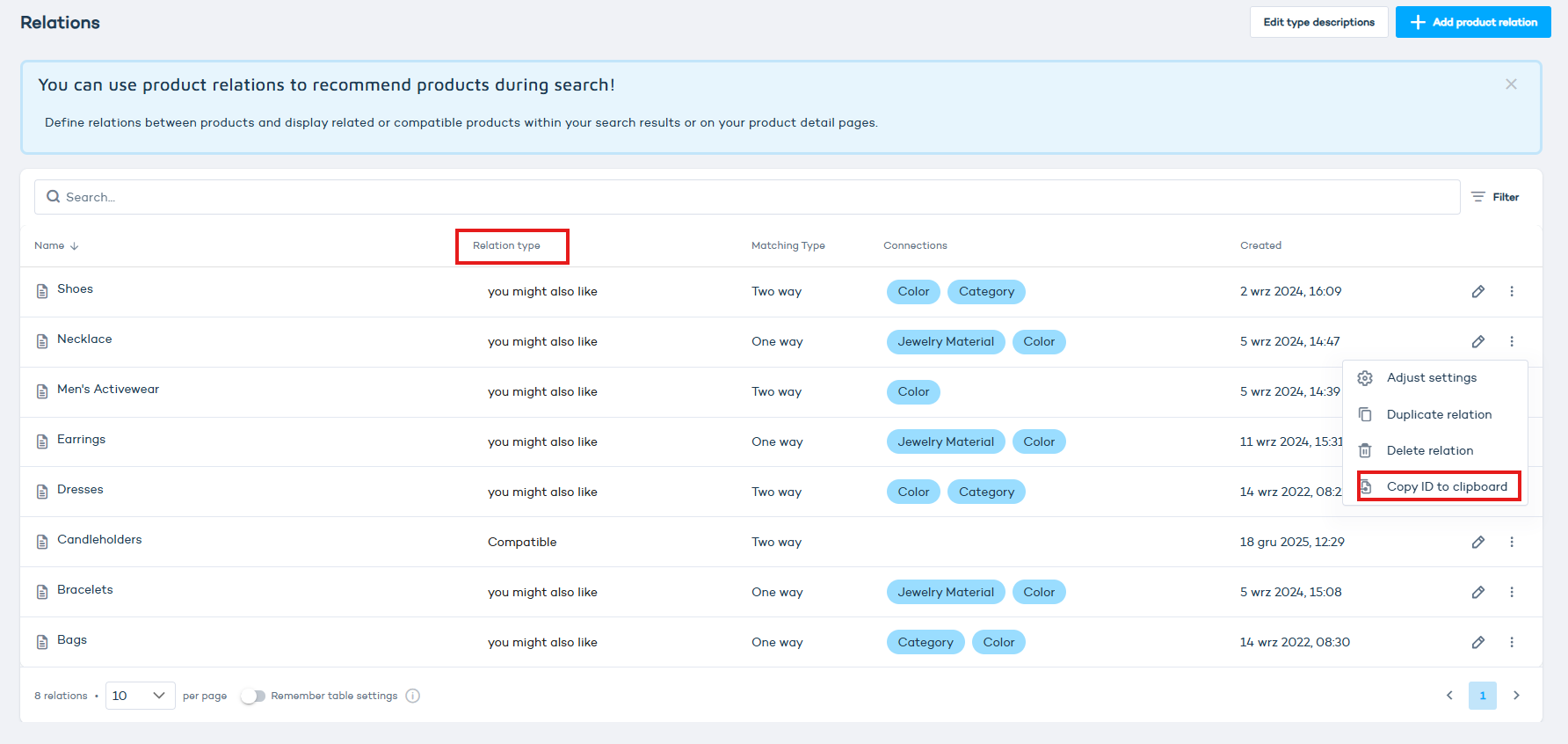
includeRelations
includeRelations is a JSON array of objects, each with a relation id and a limit that caps how many related products are returned for that relation:
[{"id":6548, "limit":5}, {"id":9878, "limit":5}]
Use this when you know exactly which relation(s) you want to resolve. Supported by Get related products and Get related products (bulk).
includeTags
includeTags is a JSON array of objects, each with a tag (the Relation Type) and an optional limitPerRelation that caps how many products are returned for each matched relation:
[{"tag":"Compatible", "limitPerRelation":4}]
Use this when you want every relation with a matching tag. Each product in the response includes a relationTypes.tags array with the matching relations. Supported by all four endpoints listed above.
On GET endpoints (Get related products, Get related products (bulk), Search products and content (GET)) the JSON value must be URL-encoded when used as a query string.
Relation-anchored search
Use this when you want to render the related products of one product (for example the accessories of the product on a product detail page) as a full search result set: the user can filter, sort, page and search within them, and filter counts reflect only the related products.
Add three parameters to Search products and content (GET) or Search products and content (POST):
| Parameter | Value | Notes |
|---|---|---|
relationIdentifier | identifier (SKU) of the anchor product | required to activate anchoring |
relationTag | a Relation Type, e.g. Compatible | resolves every relation with that tag |
relationIds | relation ids, GET: comma-separated 4,7, POST: JSON array [4, 7] | resolves those relations |
At least one of relationTag / relationIds is required next to relationIdentifier. If both are given, the selections are merged. The result set is the union of the target products of all selected relations (a product related through two relations appears once), intersected with everything else the request asks for.
GET https://api.search.zoovu.com/search?projectId=123&query=*&relationIdentifier=SKU-123&relationTag=Compatible&limit=24
POST https://api.search.zoovu.com/search?projectId=123
{
  "query": "*",
  "relationIdentifier": "SKU-123",
  "relationTag": "Compatible",
  "relationIds": [4],
  "filters": [{ "conceptIdName": "COLOR", "values": [{ "conceptIdName": "COLOR_#_BLACK" }] }],
  "sortComplex": { "conceptIdName": "PRICE", "direction": "ASC" },
  "limit": 24
}
Everything else works exactly like a normal search: query searches within the related products, filters / preSetFilters narrow them, sort / sortComplex order them (the default order is the standard search ranking, not the relation order), offset / limit page through them, and the response has the usual filterOptions with counts computed on the related products only. includeTags can still be used on top to decorate each result card.
The response echoes the anchor so that you can render context such as a breadcrumb:
"interpretedQuery": {
  "relationAnchor": { "identifier": "SKU-123", "relationIds": [4], "relationTag": "Compatible" }
}
relationIds is an empty array and relationTag is null when that part of the selection was not used.
Error responses:
| Status | When |
|---|---|
400 Bad Request | relationIdentifier without relationIds / relationTag, or relationIds / relationTag without relationIdentifier; relationIds not a list of integers; the project has no relations configured; no relation of the project matches the given ids / tag |
404 Not Found | relationIdentifier does not match any product of the project |
Only the forward direction of a relation is resolved (anchor = source product). Relations configured with two-way matching fall back to the reverse direction as usual. The dedicated Get related products endpoint keeps working unchanged.
Recommended limits
To keep query strings under common URL length limits:
includeRelations: up to 30 per requestincludeTags: up to 30 per requestidentifierson Get related products (bulk): up to 100, hard limit 1 000 (requests with more than 1 000 identifiers are rejected with400 Bad Request)
Larger requests may exceed URL length limits and fail. Split into multiple requests if needed.