Contact Zoovu Support
If you run into a technical issue or have a question about using the platform, contact the Zoovu Support team through the Zoovu Support Portal.
Support hours
| Request type | Availability |
|---|---|
| Standard requests | 7:00 AM – 9:00 PM UTC |
| Critical emergencies | 24/7 |
The first response time for tickets is 2 business hours.
Submit a ticket in the Support Portal
The Support Portal is the recommended way to contact us. You can submit a ticket in one of two ways:
- Anonymously - submit a ticket without creating an account.
- With an account - log in to keep track of all tickets submitted by you or your organization.
Log in or create an account
- Go to help.desk.zoovu.io.
- Click Log in.
- Enter your email address.
- Do one of the following:
- If you already have an account, log in.
- If you don't have an account yet, sign up.
Once you're logged in, you can create new tickets and view the status of existing ones.
Contact Support by email
You can also submit a ticket by sending an email to [email protected].
We recommend using the Support Portal instead of email. The portal collects the information the Support team needs up front, so your request can be resolved faster.
What to include in your ticket
To help us resolve your issue quickly, include as much of the following as possible:
- A short, descriptive subject (add URGENT for urgent issues).
- The studio or area of the platform where the issue occurs.
- The name or ID of the affected project, assistant, or search experience.
- Steps to reproduce the issue, and what you expected to happen.
- Screenshots, error messages, or links that show the problem.
- When the issue started and how many users it affects.
Report an urgent issue
If your issue needs immediate attention, flag it as urgent in one of the following ways:
- Add URGENT to the ticket subject - include the word URGENT in the subject when you create the ticket. This lets the Support team identify and prioritize it right away.
- Reply URGENT to the after-hours auto-reply - if you submit a ticket outside standard support hours, you receive an automatic reply confirming that your ticket was received. Reply to that email with URGENT to trigger the on-call alerting system, so the on-call team is notified immediately.
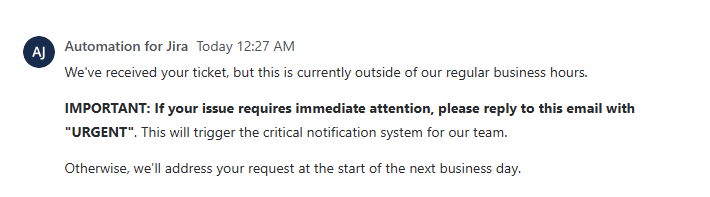
Use URGENT only for critical issues that can't wait until the next business day, such as a production outage. Outside standard support hours, tickets without the URGENT flag are handled at the start of the next business day.