Part 3: Make it yours
- You need: Part 2 finished, with
yarn startstill running. - You get: a text you can edit and translate in Experience Designer, a working Add to cart, and a decision on the assistant launcher.
The theme looks like Solstice. In this part you make it behave like your shop.
Step 12: A text you can edit and translate (15 min)
Goal: add a line under the results headline that an editor can change in Experience Designer without touching code.
Skill: add a setting through the preset, the configuration and the component.
No text is written into a component. Every text has three homes that share one key, here subheadlineText:
- The preset gives it a default and a label. An editor changes the text on the Translation page of Experience Designer.
- The configuration class gives it a type, so a misspelt key fails
yarn typecheck. - The component renders it through
t(), which picks the translation for the advisor's locale.
That is why an editor can reword or translate your theme without asking you.
- By hand
- With an AI assistant
All three files are in src/components/results-page/. Start with the preset. Add the field after headlineText:
    headlineText: standardText({
      default: 'Your Recommendations',
      label: 'Headline Text',
    }),
    subheadlineText: standardText({
      default: 'Picked for your next trip.',
      label: 'Subheadline Text',
    }),
    resultsLabel: standardText({ default: 'Results', label: 'Results Label' }),
Give it a type:
export class ResultsPageConfiguration {
  headlineText!: string;
  subheadlineText!: string;
  resultsLabel!: string;
Render it. In the template, wrap the headline in a <div> and put the new <p> next to it. The wrapper keeps the two lines close together:
      <RestartButton :advisor="advisor" />
    </div>

    <div class="results-page__intro">
      <h2 class="results-page__headline">
        {{ t(componentConfiguration.headlineText) }}
      </h2>
      <p class="results-page__subheadline">
        {{ t(componentConfiguration.subheadlineText) }}
      </p>
    </div>

    <template v-if="hasProducts">
Style both in the same file, in <style scoped>. One rule goes above .results-page__headline and one below it:
.results-page__intro {
  display: flex;
  flex-direction: column;
  gap: var(--zv-space-sm);
}

.results-page__headline {
  font-family: var(--zv-font-heading);
  font-weight: var(--zv-font-weight-bold);
  font-size: var(--zv-font-size-xl);
  line-height: var(--zv-line-height-snug);
  color: var(--zv-text-heading);
  margin: 0;
  text-align: center;
}

.results-page__subheadline {
  font-family: var(--zv-font-body);
  font-size: var(--zv-font-size-md);
  line-height: var(--zv-line-height-loose);
  color: var(--zv-text-secondary);
  text-align: center;
}

.results-page__products {
The <p> sets its own font-family. Without it, the line falls back to the browser's default font.
A new text has no translation until an editor publishes one, and t() then warns in the browser console. In src/i18n/index.ts, return the text itself when there is no translation:
export function useT(): TranslateFn {
  const { t, te } = useI18n({ useScope: 'global' });
  return ((key: string, params?: Record<string, unknown>) => {
    if (typeof key !== 'string') return key as unknown as string;
    if (!params) {
      return te(key) ? t(key) : key;
    }
    // An unpublished default is a literal sentence, not a message id: vue-i18n
    // returns it verbatim, so substitute its placeholders here.
    return te(key) ? t(key, params) : interpolate({ text: key, params });
  }) as TranslateFn;
}
Start a new conversation and give your assistant this task:
Add a translatable subheadline under the results headline. Follow the pattern of `headlineText` in `src/components/results-page/`: add `subheadlineText` to `results-page.preset.ts` (`standardText`, default "Picked for your next trip.", label "Subheadline Text") and to `results-page.configuration.ts`, and render it with `t()` in `results-page.component.vue`, in a `<p>` that shares a wrapper `<div>` with the headline. Style it with variables only: body font, secondary text colour, centred. In `src/i18n/index.ts`, when `t()` gets no params and `te(key)` is false, return the key itself. Run `yarn lint:css && yarn lint && yarn typecheck`.
Read the change before you accept it. It should touch about 30 lines in four files. The By hand tab shows what to expect.
Go to the results page in the browser.
You should now see Picked for your next trip. in grey under the results headline. The console shows no Not found warning for it.
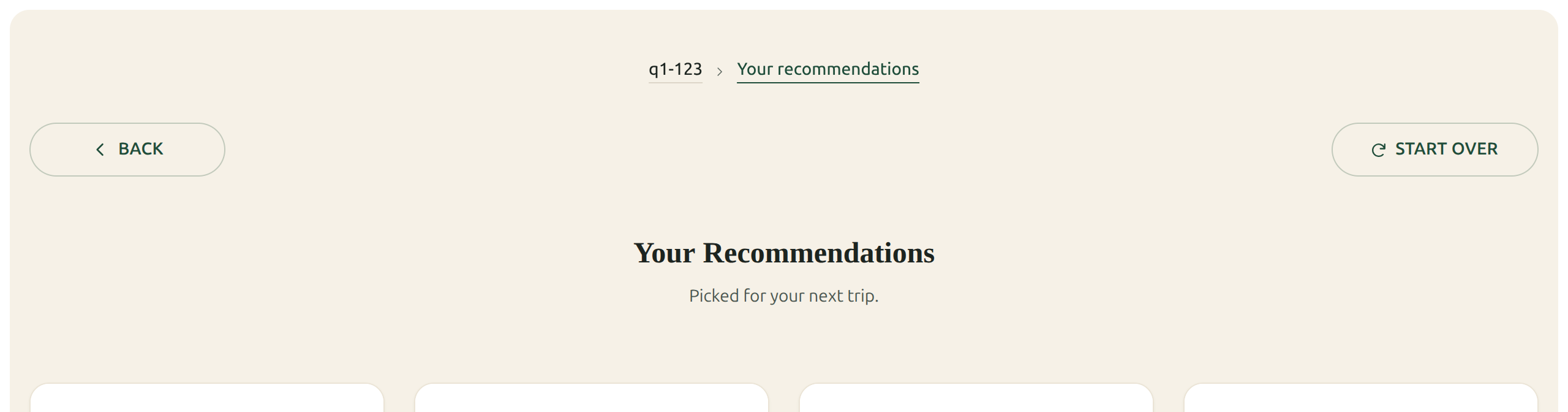
The default of a new field shows straight away.
Run three of the gates:
yarn lint:css && yarn lint && yarn typecheck
All three pass when they print no error.
Commit:
git commit -am "Add a subheadline an editor can change"
In Step 20 you change this sentence in Experience Designer, without opening your editor.
Step 13: Send Add to cart to the shop (15 min)
Goal: make the Add to cart button tell your shop which product was added.
Skill: keep calls to the outside world in a helper, and track only what really happened.
In the template the button shows a message and records the event, but no shop hears about it. You build the real path in three layers, over three steps: the path to the shop here, the message for a refusal in Step 14, the tests in Step 15.
- A helper talks to the shop. Calls to the outside world live in
src/helpers/, never in a.component.vuefile:yarn lintrejectsfetchthere, and a helper can be tested and replaced on its own. - A composable calls the helper and records the tracking event only after the shop said yes. A product that never reached the cart must not count as added.
- The component only picks the message to show.
- By hand
- With an AI assistant
1. The helper. Create the file:
export const ADD_TO_CART_EVENT = 'solstice:add-to-cart';

export function addToShopCart({ sku }: { sku: string }): Promise<void> {
  const request = new CustomEvent(ADD_TO_CART_EVENT, {
    detail: { sku },
    cancelable: true,
  });
  if (window.dispatchEvent(request)) {
    return Promise.resolve();
  }
  return Promise.reject(new Error('ADD_TO_CART_REFUSED'));
}
This is a stand-in for a shop. It announces the product on the page as a solstice:add-to-cart event, and it fails when the page refuses the event. In a real shop you replace the body of addToShopCart with your shop's own cart call: the line window.dispatchEvent(request) is where that call goes. Keep the contract: resolve when the product is in the cart, reject when it is not.
The stand-in also resolves when nothing on the page listens for the event, so it is for the workshop only.
2. The composable. Add addToCart() next to recordAddToCart():
import type { ProductRecommendation } from '@zoovu/exd-api';
import { addToShopCart } from '../helpers/add-to-shop-cart';

export const useProductAddToCart = (product: () => ProductRecommendation) => {
  const recordAddToCart = (): void => {
    product().notifyProductAddedToCart();
  };

  const addToCart = async (): Promise<boolean> => {
    try {
      await addToShopCart({ sku: product().sku });
    } catch {
      return false;
    }
    recordAddToCart();
    return true;
  };

  return { recordAddToCart, addToCart };
};
recordAddToCart() runs only after the await succeeded.
3. The button. Open the footer component, where the button lives. In its <script setup>, take addToCart from the composable instead of recordAddToCart:
const { recordClickout } = useProductClickout(() => props.product);
const { addToCart } = useProductAddToCart(() => props.product);

const toggleCompare = () => {
Replace handleAddToCart, with its comment, by these two functions:
const openComparison = () => {
  EventBus.$emit('zv:modal:open:comparison');
};

const showToast = (message: string): void => {
  EventBus.$emit('zv:toast:show', { message });
};

const handleAddToCart = async (): Promise<void> => {
  if (await addToCart()) {
    showToast(props.addToCartToastText);
  } else {
    showToast(props.addToCartErrorToastText);
  }
};
</script>
Your editor underlines addToCartErrorToastText for now. That text arrives in Step 14.
The task covers Steps 13, 14 and 15 in one go. Start a new conversation and give your assistant this task:
Replace the placeholder in `handleAddToCart` in `src/components/product-card/components/product-card-footer/product-card-footer.component.vue`.

1. Create `src/helpers/add-to-shop-cart.ts` exporting `ADD_TO_CART_EVENT` ('solstice:add-to-cart') and `addToShopCart({ sku })`. It dispatches a cancelable window event of that name with `detail: { sku }` and returns a promise that rejects with `ADD_TO_CART_REFUSED` if a listener cancels the event.
2. In `src/composables/use-product-add-to-cart.ts` add `addToCart()`: await the helper, call `recordAddToCart()` only on success, return whether it worked.
3. In the component show `addToCartToastText` on success and a new translatable `addToCartErrorToastText` on failure (preset, configuration, prop; default "Please try again. This product is not in your cart yet."). Emit the failure toast with `variant: 'error'`, and give `src/components/toast/toast.teleport.component.vue` an `error` variant: a cross icon on `var(--zv-bg-error)`, and let long messages wrap instead of cutting them off.
4. Add unit tests next to the helper and the composable in the existing style (`getProductFixture`).

No call to the outside world in a `.component.vue` file. Run all four gates.
Read the change before you accept it. It should touch about 130 lines in nine files: the helper and its test, the composable and its test, the product card's preset, configuration and component, the footer component and the toast component. Check one thing yourself: recordAddToCart() runs only after the awaited call succeeded.
Try it. On the results page, open the browser's console and paste:
addEventListener('solstice:add-to-cart', (event) => console.log('Shop cart got', event.detail.sku));
Click Add to cart on a product card.
You should now see the message Added to cart at the top of the page, and a line in the console that starts with Shop cart got and ends with the product's SKU. Keep the console open for Step 14.
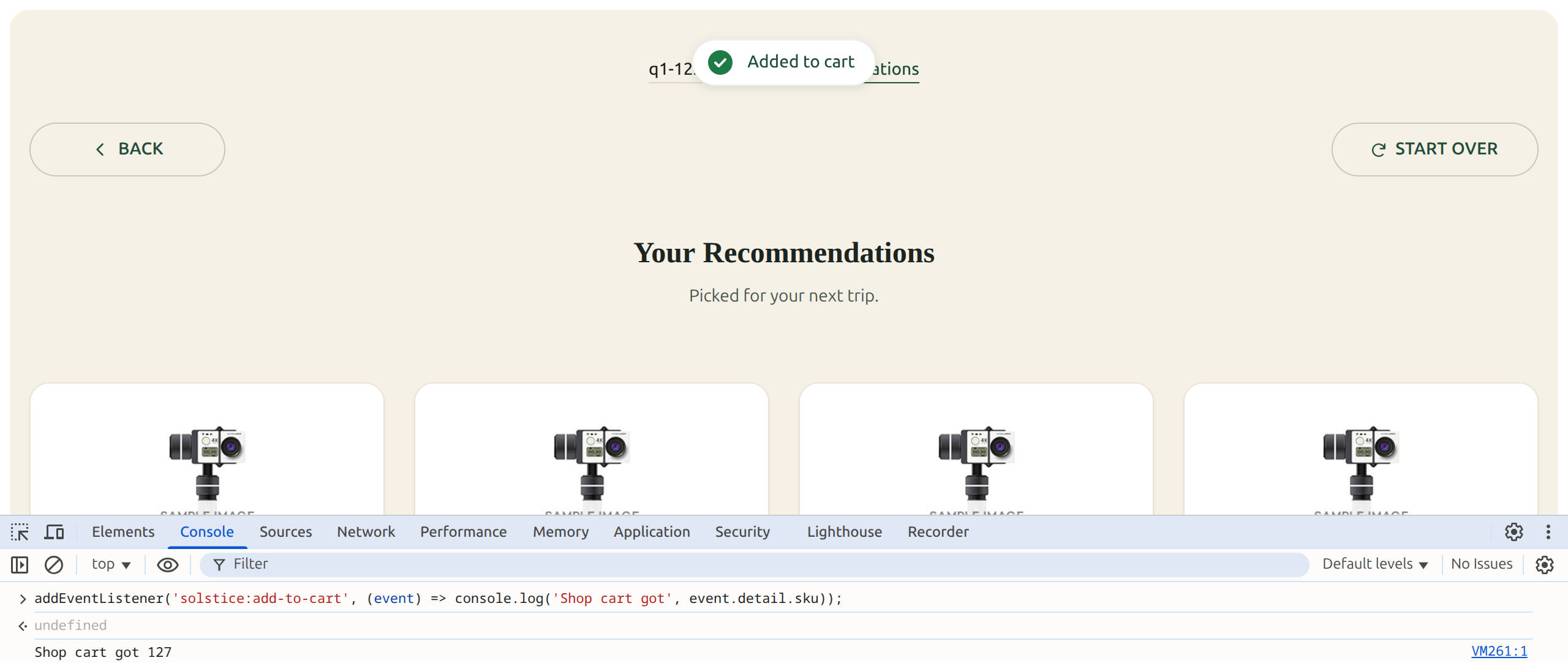
The gates wait until Step 14: yarn typecheck fails until the failure text exists.
The step added a new file, so add it first.
Commit:
git add -A
git commit -m "Wire Add to cart to the shop"
Step 14: Say so when the shop refuses (5 min)
Goal: tell the shopper when the product did not reach the cart.
Skill: add a text and hand it down to the component that shows it.
The message is a text, so it goes through the preset and the configuration, as in Step 12.
- By hand
- With an AI assistant
1. The text. Add it to the product card's preset, after addToCartToastText:
    addToCartToastText: standardText({
      default: 'Added to cart',
      label: 'Add To Cart Toast Text',
    }),
    addToCartErrorToastText: standardText({
      default: 'Please try again. This product is not in your cart yet.',
      label: 'Add To Cart Error Toast Text',
    }),
  },
Give it a type:
  opensInNewTabLabel!: string;
  addToCartToastText!: string;
  addToCartErrorToastText!: string;
}
2. Hand the text to the button. The product card passes its texts to the footer:
        :tracked-url="trackedUrl"
        :add-to-cart-toast-text="componentConfiguration.addToCartToastText"
        :add-to-cart-error-toast-text="
          componentConfiguration.addToCartErrorToastText
        "
        :compare-label="t(componentConfiguration.compareLabel)"
3. Accept it. In the footer's <script setup>, add the prop:
  trackedUrl: string;
  addToCartToastText: string;
  addToCartErrorToastText: string;
  compareLabel: string;
4. Mark it as a failure. In the same file, send the message with a variant:
const showToast = (toast: { message: string; variant?: 'error' }): void => {
  EventBus.$emit('zv:toast:show', toast);
};

const handleAddToCart = async (): Promise<void> => {
  if (await addToCart()) {
    showToast({ message: props.addToCartToastText });
  } else {
    showToast({ message: props.addToCartErrorToastText, variant: 'error' });
  }
};
</script>
5. Give failures their own look. Open src/components/toast/toast.teleport.component.vue. In the template, let the icon follow the variant:
          <span
            :class="['zv-toast__icon', `zv-toast__icon--${variant}`]"
            aria-hidden="true"
          >
            <svg width="14" height="14" viewBox="0 0 14 14" fill="none">
              <path
                :d="ICON_PATHS[variant]"
                stroke="currentColor"
                stroke-width="2"
                stroke-linecap="round"
                stroke-linejoin="round"
              />
            </svg>
          </span>
In the <script setup>, add the variant type, the two icons and a check for the new field:
type ToastVariant = 'success' | 'error';

interface ToastPayload {
  message: string;
  duration?: number;
  variant?: ToastVariant;
}

const ICON_PATHS: Record<ToastVariant, string> = {
  success: 'M3 7.2L5.8 10L11 4.5',
  error: 'M4 4L10 10M10 4L4 10',
};

const isToastVariant = (value: unknown): value is ToastVariant =>
  value === 'success' || value === 'error';
  if ('duration' in payload && typeof payload.duration !== 'number') {
    return false;
  }
  if ('variant' in payload && !isToastVariant(payload.variant)) {
    return false;
  }
  return 'message' in payload && typeof payload.message === 'string';
Remember the variant of the current message:
const visible = ref(false);
const message = ref('');
const variant = ref<ToastVariant>('success');
let dismissTimer: ReturnType<typeof setTimeout> | null = null;
const show = (payload: ToastPayload) => {
  clearTimer();
  message.value = payload.message;
  variant.value = payload.variant ?? 'success';
  visible.value = true;
  dismissTimer = setTimeout(() => {
    visible.value = false;
  }, payload.duration ?? DEFAULT_DURATION_MS);
};
In the styles, colour the error icon, and replace the .zv-toast__message rule so a long message wraps instead of being cut off:
.zv-toast__icon--error {
  background: var(--zv-bg-error);
}

.zv-toast__message {
  text-align: start;
  text-wrap: balance;
}
Your assistant did this in Step 13, and you committed it there. Compare its change with the By hand tab, run this step's check, and skip this step's commit.
Now play a shop that says no. Paste this, then click Add to cart again:
addEventListener('solstice:add-to-cart', (event) => event.preventDefault(), { once: true });
You should now see Please try again. This product is not in your cart yet. next to a red cross, on two lines on a phone. The next click shows Added to cart with a green check again.
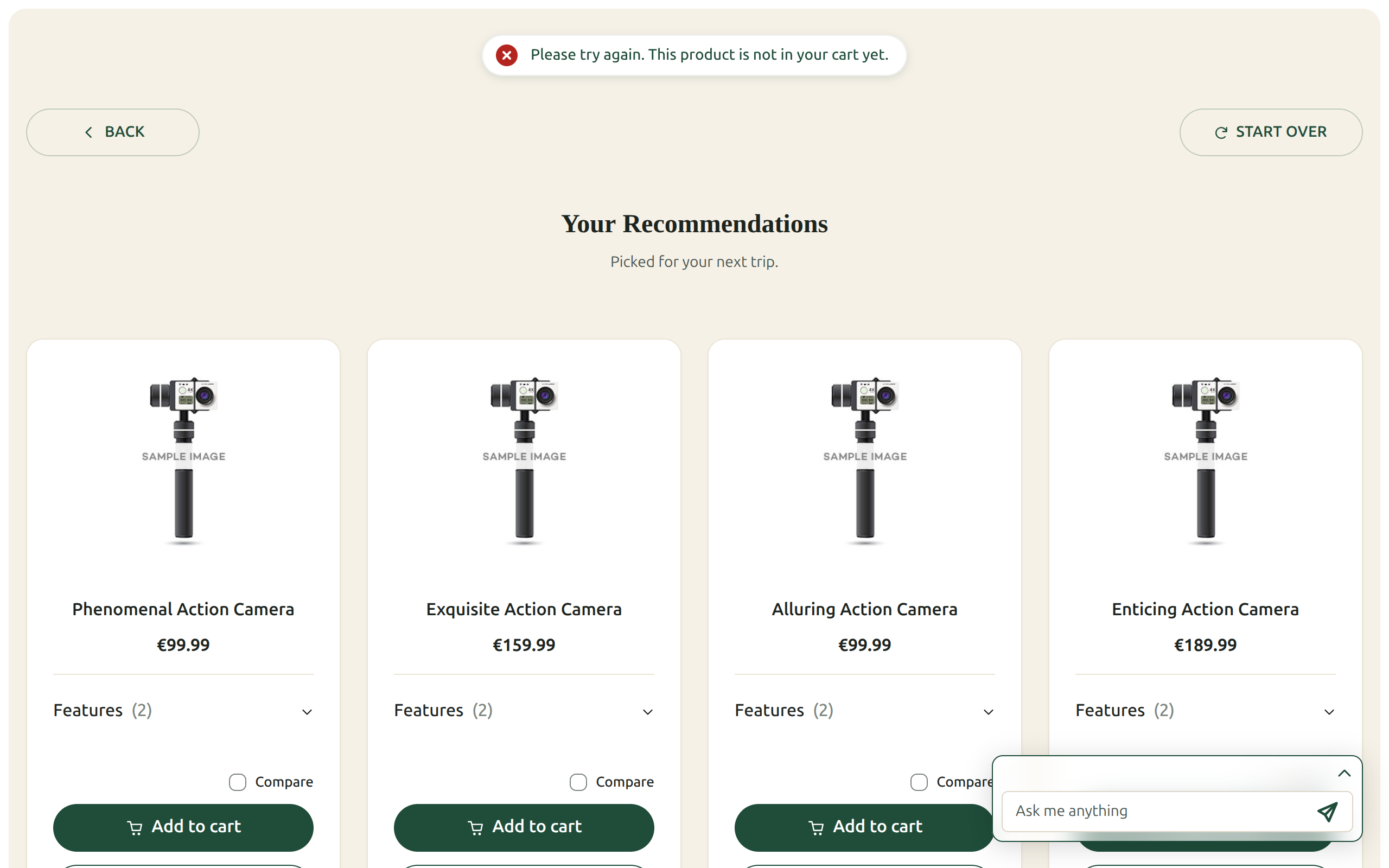
Run three of the gates:
yarn lint:css && yarn lint && yarn typecheck
All three pass when they print no error.
Commit:
git commit -am "Say so when the shop refuses"
Step 15: Pin it with tests (5 min)
Goal: make sure nobody breaks the rule later: no tracking without a cart.
Skill: test a helper on its own, and a composable with the helper mocked.
- By hand
- With an AI assistant
Create the helper's test:
import { afterEach, describe, expect, it, vi } from 'vitest';
import { ADD_TO_CART_EVENT, addToShopCart } from '../add-to-shop-cart';

const refuse = (request: Event): void => request.preventDefault();

afterEach(() => {
  window.removeEventListener(ADD_TO_CART_EVENT, refuse);
});

describe('addToShopCart', () => {
  it('tells the shop page which product to add', async () => {
    const onRequest = vi.fn();
    window.addEventListener(ADD_TO_CART_EVENT, onRequest, { once: true });

    await addToShopCart({ sku: 'TENT-2' });

    expect(onRequest.mock.calls[0][0].detail).toEqual({ sku: 'TENT-2' });
  });

  it('fails when the shop page refuses the request', async () => {
    window.addEventListener(ADD_TO_CART_EVENT, refuse);

    await expect(addToShopCart({ sku: 'TENT-2' })).rejects.toThrow(
      'ADD_TO_CART_REFUSED',
    );
  });
});
Then replace the whole file of the composable's test with this. The highlighted lines are new:
import { beforeEach, describe, expect, it, vi } from 'vitest';
import { useProductAddToCart } from '../use-product-add-to-cart';
import { addToShopCart } from '../../helpers/add-to-shop-cart';
import { getProductFixture } from '../../test-utils/fixtures';

vi.mock('../../helpers/add-to-shop-cart');

beforeEach(() => {
  vi.mocked(addToShopCart).mockReset();
});

describe('useProductAddToCart', () => {
  it('tells the runner once that the shopper added the product to the cart', () => {
    const product = getProductFixture();
    const { recordAddToCart } = useProductAddToCart(() => product);

    recordAddToCart();

    expect(product.notifyProductAddedToCart).toHaveBeenCalledOnce();
  });

  it('adds the product to the shop cart by SKU, then tells the runner', async () => {
    vi.mocked(addToShopCart).mockResolvedValue();
    const product = getProductFixture();

    const added = await useProductAddToCart(() => product).addToCart();

    expect(added).toBe(true);
    expect(addToShopCart).toHaveBeenCalledWith({ sku: 'DW-42' });
    expect(product.notifyProductAddedToCart).toHaveBeenCalledOnce();
  });

  it('does not tell the runner when the shop cart fails', async () => {
    vi.mocked(addToShopCart).mockRejectedValue(new Error('CART_DOWN'));
    const product = getProductFixture();

    const added = await useProductAddToCart(() => product).addToCart();

    expect(added).toBe(false);
    expect(product.notifyProductAddedToCart).not.toHaveBeenCalled();
  });
});
Your assistant did this in Step 13, and you committed it there. Compare its change with the By hand tab, run this step's check, and skip this step's commit.
Run all four gates:
yarn lint:css && yarn lint && yarn typecheck && yarn test
The run ends with four more tests than before:
 Test Files  13 passed (13)
      Tests  110 passed (110)
With an AI assistant the numbers can be higher. What matters is that none failed.
The step added a new file, so add it first.
Commit:
git add -A
git commit -m "Pin Add to cart with tests"
Step 16: Remove the assistant launcher (5 min)
Goal: keep the assistant launcher if your advisor has a Zoe assistant, or remove it.
Skill: remove a feature cleanly: the tag and its import.
The box in the bottom-right corner opens the assistant. The template shows it for every advisor.
Click the launcher to find out which applies:
- A chat opens and answers your question: your advisor has a Zoe assistant. Keep the launcher and go to Step 17.
- The panel stays empty: your advisor has none. Remove the launcher. It is one tag and one import.
- By hand
- With an AI assistant
In the template, delete the highlighted lines, the <ZoeDock /> tag and the empty line above it:
    <ToastComponent />

    <ZoeDock />
  </div>
</template>
In the same file, delete the highlighted import:
import ToastComponent from './components/toast/toast.teleport.component.vue';
import ZoeDock from './components/zoe/zoe-dock.teleport.component.vue';
import './css/tokens.css';
Give your assistant this task:
Remove the Zoe assistant launcher from `src/advisor-view.component.vue`: delete the `<ZoeDock />` tag and its import. Change nothing else. Run the four gates.
Read the change before you accept it. It should delete three lines in one file.
You should now see the bottom-right corner empty on every page.
Before:
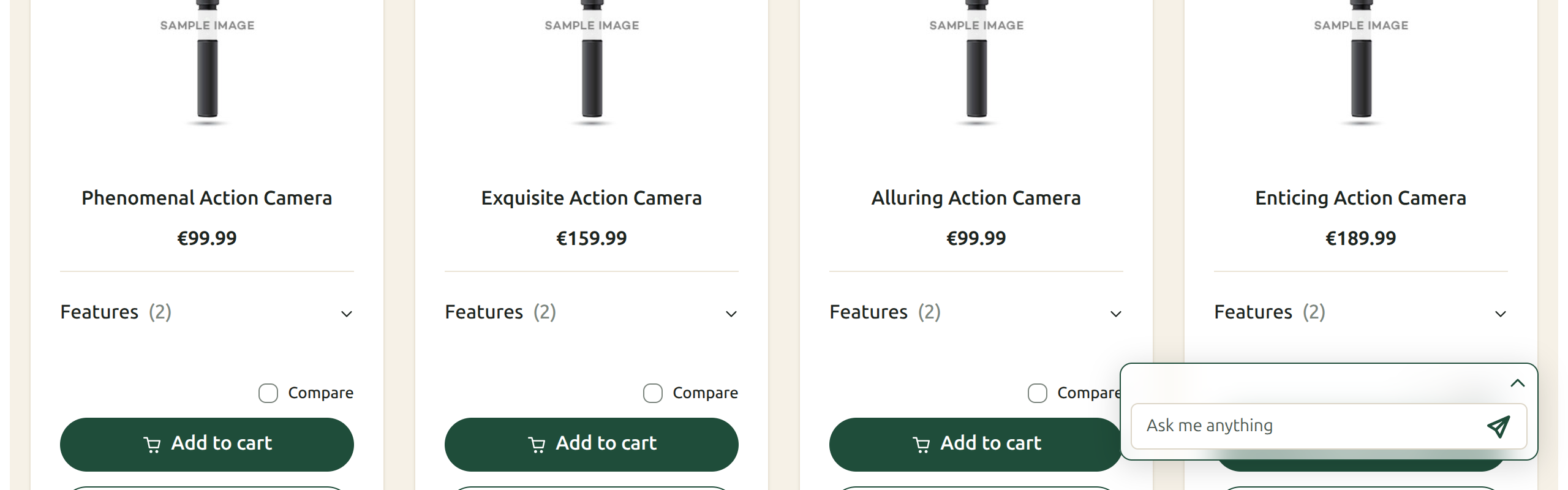
After:
Run all four gates:
yarn lint:css && yarn lint && yarn typecheck && yarn test
Commit:
git commit -am "Remove the assistant launcher"
Step 17: Check tracking still works (10 min)
Goal: confirm that your changes kept every tracking call in place.
Skill: review a change against the tracking rules in AGENTS.md.
Your advisor's reports are built from tracking events. The runner sends an event whenever something goes through its API: a tracked product link, Next and Back, Load More, recordAddToCart(). yarn start loads the advisor with tracking off, so here you check the code, not the events.
- By hand
- With an AI assistant
Check four things.
1. The product link. Open the footer component. The link still uses the tracked address and records the click:
    <a
      v-if="trackedUrl"
      :href="trackedUrl"
      target="_blank"
      rel="noopener noreferrer"
      class="product-card-footer__btn product-card-footer__btn--outline"
      :aria-label="`${goToProductLabel} ${opensInNewTabLabel}`"
      @click="recordClickout"
    >
2. Add to cart. Open src/composables/use-product-add-to-cart.ts. recordAddToCart() comes after the awaited cart call, and the catch branch returns before it. Two of your tests from Step 15 hold this in place.
3. Load More. Open src/components/results-page/results-page.component.vue and find loadMore. It still ends with the runner's own call:
  }
  nav.nextPage();
};
</script>
4. Next and Back. You never opened the navigation components. Let git confirm it:
git log --oneline -- src/components/navigation-buttons src/components/navigation-bar
You should now see one line, your first commit, Start from the template.
Give your assistant this task:
Review my changes since the first commit against the Tracking section of AGENTS.md. List every runner call I removed, moved or bypassed, with file and line. Change nothing.
The change it should list: recordAddToCart() moved from the footer component into addToCart() in src/composables/use-product-add-to-cart.ts, after the awaited cart call. That is the change you made in Step 13.
Keep this habit on real projects: when you change a component that calls the runner, read the Tracking section of AGENTS.md before you call the change done.
Checkpoint. It looks like Solstice and behaves like your shop: an editor can change your text, Add to cart reaches the shop, and tracking is intact. Your work is committed: git log --oneline shows 13 lines, or 14 if you removed the launcher. With an AI assistant, two fewer.
If something is off
- You changed a
defaultin a*.preset.tsfile and the page still shows the old text. The advisor has a saved value for that setting, and a saved value wins over the default in the preset. Change the text on the Translation page of Experience Designer instead. yarn typecheckreports an error aboutaddToCartErrorToastText. The text is missing in one of its three places. Compare the preset, the configuration and the two components with Step 14.yarn lintreports'ZoeDock' is defined but never used. You deleted the tag in Step 16 and kept its import. Delete theimport ZoeDock …line too.
The Troubleshooting page has more.
Next: Part 4: Ship it.