Search preview
Search Preview lets you test how queries are interpreted and how results are ranked before changes go live.
To see how your search mappings appear in the results:
- Go to the "Search Preview" tab.
- Enter a keyword in the search box and press Enter.
- Hover over the query matching symbol to view the applied mappings.
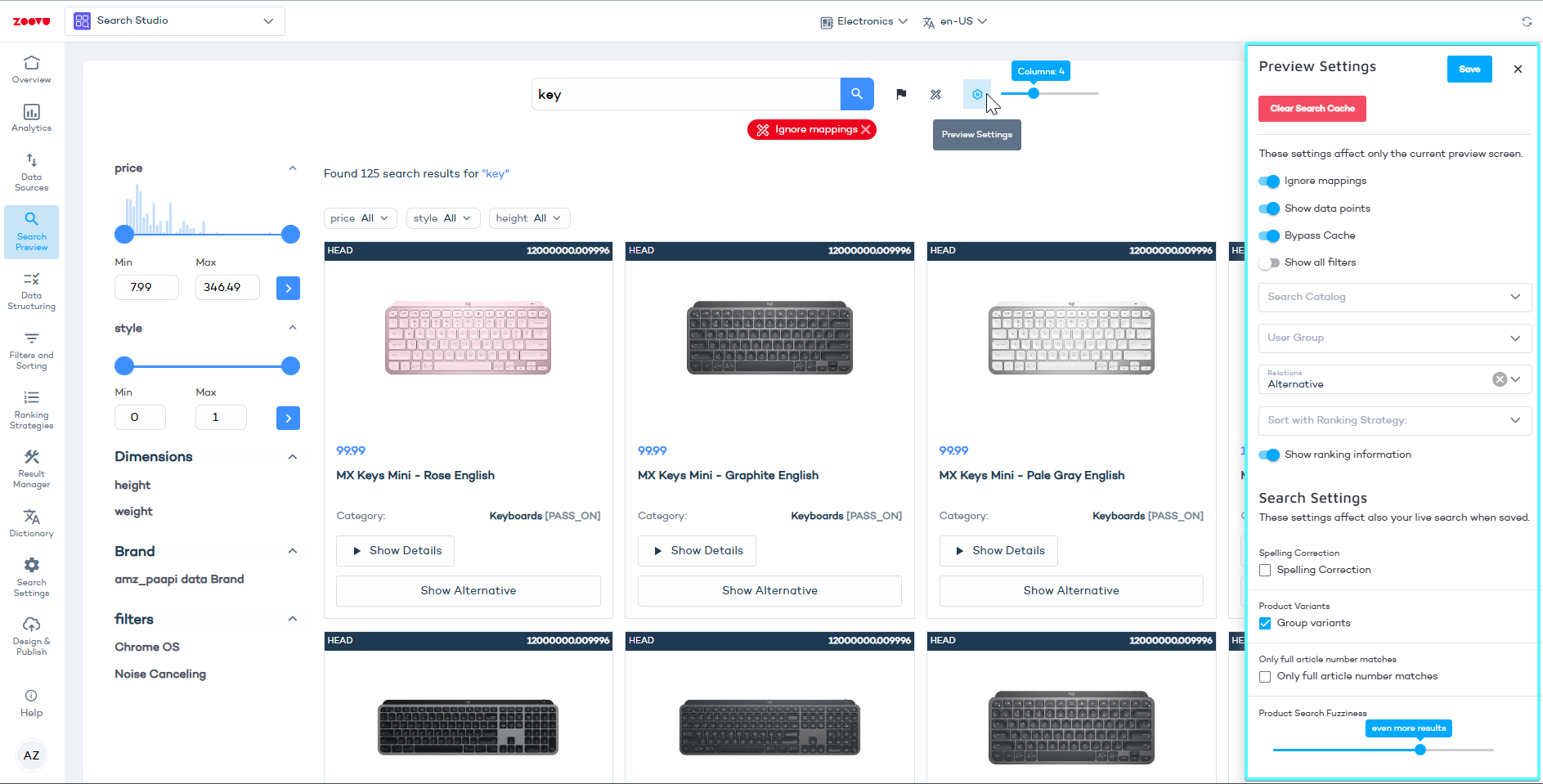
Use the search box to test:
- everyday search queries
- SKU or article number searches
- navigational queries using special formats
Handle broad or imprecise shopper queries
Objective: Return relevant products when shoppers use short, generic or slightly incorrect queries.
- Enter a representative query in Search Preview.
- Open preview settings using the gear icon.
- Increase Product Search Fuzziness to a less strict level.
- Enable Spelling correction.
- Run the query again and review results.
What to validate:
- Relevant products remain visible at the top.
- Additional results increase coverage without reducing relevance.
Support exact SKU and article number searches
Objective: Precise results for users searching by SKU or part number.
- Test a real SKU or article number in Search Preview.
- Reduce Product Search Fuzziness to a strict level.
- Enable Exact article number match.
- Re-run the query.
What to validate:
- The expected product appears first.
- Close or partial matches do not override exact results.
Consolidate product variants in search results
Objective: Prevent multiple near-identical products from appearing as separate results.
- Search for a product with multiple variants.
- Enable Product variants grouping.
What to validate:
- Variants are grouped under a single result.
- Variant selection remains accessible to users.
Refine autocomplete suggestions
Objective: Guide users while typing and reduce friction during query formulation.
- Start typing a query in the search field.
- Adjust Search suggestion fuzziness.
- Enable or disable Suggestions only on titles.
What to validate:
- Title-only suggestions remain focused and predictable.
- Broader suggestions support discovery when enabled.
Influence result ranking for key products
Objective: Promote strategically important products in search results.
- Open Advanced settings in Search Preview.
- Adjust Title, Content or Data Point boost values.
What to validate:
- Priority products rank higher without disrupting relevance.
- Ranking behavior remains consistent across scenarios.
Control search result snippets
Objective: Present useful and consistent information beneath each result.
- Open Search snippet settings.
- Choose how snippets are generated:
- Content around the query
- First paragraphs
- Custom XPath
- Refresh the preview.