Set up SAP CPQ in Configuration Studio
Use SAP CPQ in Configuration Studio to build configurator sections for products that must resolve to a single, valid, purchasable configuration. SAP provides the product model, configuration logic, and optional pricing data.
Before you start
Before setting up SAP CPQ, make sure you have:
- SAP connection credentials
- the SAP authentication URL
- the Variant Configuration Service base URL
- the knowledge base ID
- the product ID
- the API language for each locale you want to support
- pricing service details, if you plan to use SAP pricing
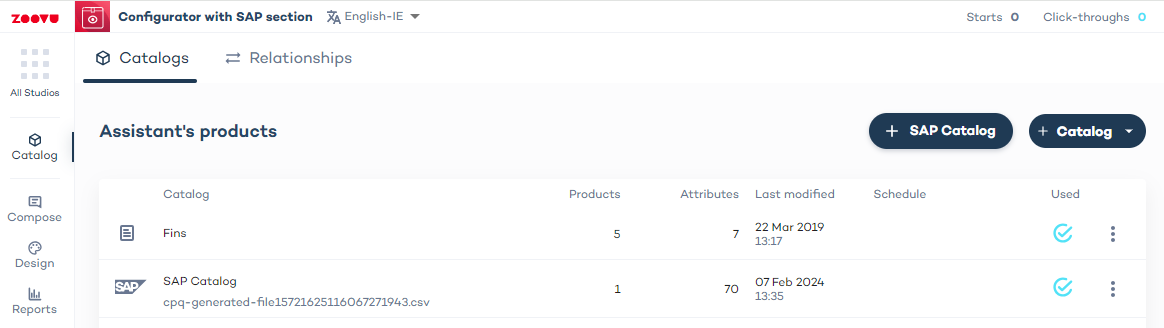
Create an SAP Catalog
- Open your configurator in Conversation Studio (or use the standalone Configuration Studio).
- In the Catalog tab, create a new catalog for your configurator.
You will see two options:
- SAP Catalog for SAP CPQ-based configuration
- Catalog for a standard catalog data source
Select SAP Catalog to create a new SAP CPQ collection. This opens the Map product details form, where you define the SAP connection settings for the catalog.
Connection settings
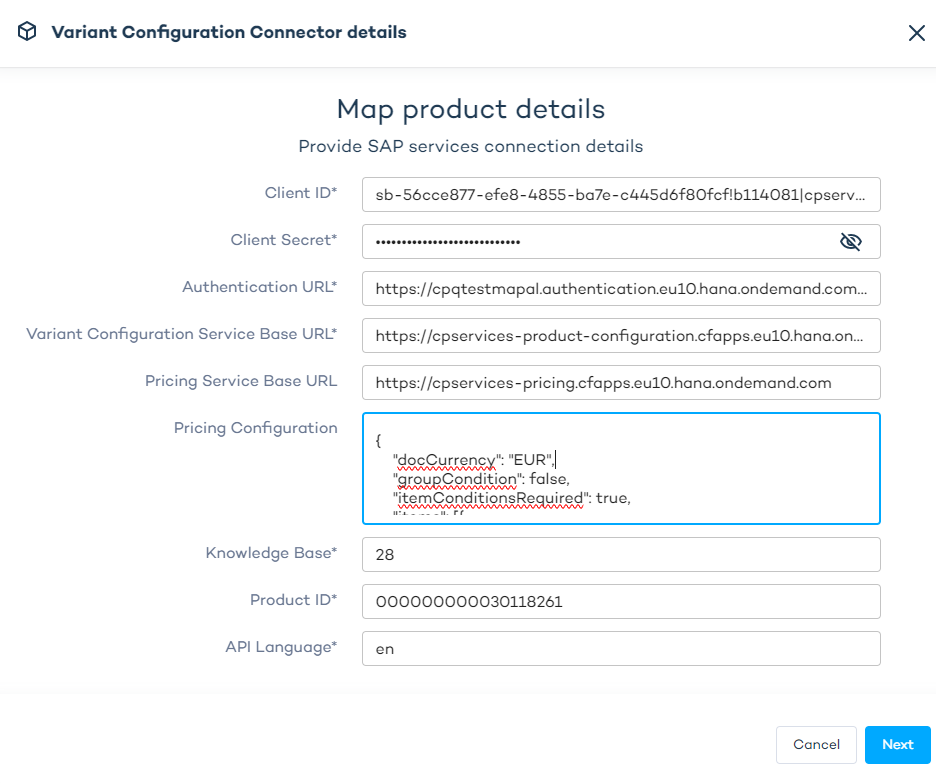
In Map product details, enter the settings required for authentication, product configuration, and optional pricing.
Required fields
These fields are required for product configuration:
- Client ID →
clientId - Client Secret →
clientSecret - Authentication URL →
authenticationUrl - Variant Configuration Service Base URL →
baseUrl - Knowledge Base →
knowledgeBase - Product ID →
productId - API Language →
apiLanguage
Optional pricing fields
Use these fields only if you want SAP to calculate pricing:
- Pricing Service Base URL →
psBaseUrl - Pricing Configuration →
pricingConfiguration
JSON example
{
  "clientId": "sb-56cce877-efe8-4855-ba7e-c445d6f80fcf!b114081|cpservices-secured!b1725",
  "clientSecret": "GqKMEmXJ9UTFgZ5gOtkQZgS3uEQ=",
  "authenticationUrl": "https://ottobock-cps-dev.authentication.eu10.hana.ondemand.com/oauth/token",
  "baseUrl": "https://cpservices-product-configuration.cfapps.eu10.hana.ondemand.com",
  "psBaseUrl": "https://cpservices-pricing.cfapps.eu10.hana.ondemand.com",
  "pricingConfiguration": "{\"docCurrency\": \"GBP\",\"groupCondition\": false,\"itemConditionsRequired\": true,\"items\": [{\"accessDateList\": [{\"name\": \"KOMK-PRSDT\",\"value\": \"2024-05-01\"}, {\"name\": \"KOMK-FBUDA\",\"value\": \"2024-05-01\"}],\"itemId\": \"1\",\"attributes\": [{\"name\": \"KOMK-PLTYP\",\"values\": [\"Z1\"]}, {\"name\": \"KOMK-VKORG\",\"values\": [\"0001\"]}, {\"name\": \"KOMK-VTWEG\",\"values\": [\"01\"]}, {\"name\": \"KOMK-WAERK\",\"values\": [\"GBP\"]}, {\"name\": \"KOMP-PMATN\",\"values\": [\"$.productKey\"]}, {\"name\": \"KOMK-SPART\",\"values\": [\"01\"]}, {\"name\": \"KOMK-LAND1\",\"values\": [\"UK\"]}, {\"name\": \"KOMP-PRSFD\",\"values\": [\"X\"]}, {\"name\": \"KOMP-VARCOND\",\"values\": [\"$.rootItem.characteristics[?(@.id == \\\"VC057\\\")].values[0].value\"]}, {\"name\": \"PRSFD\",\"values\": [\"X\"]}],\"quantity\": {\"unit\": \"PCE\",\"value\": 5},\"productDetails\": {\"productId\": \"$.productKey\",\"baseUnit\": \"PCE\",\"alternateProductUnits\": null},\"statistical\": false,\"variantConditions\": [{\"factor\": 1,\"key\": \"$.rootItem.characteristics[?(@.id == \\\"VC057\\\")].values[0].value\"}]}],\"locCurrency\": \"GBP\", \"pricingProcedure\":\"ZVAR15\"}",
  "knowledgeBase": "28",
  "productId": "000000000030118261",
  "apiLanguage": "en"
}
Map product details form to JSON properties mapping:
- Client ID →
cliendId - Client Secret →
clientSecret - Authentication URL →
authenticationUrl - Variant Configuration Service Base URL →
baseUrl- used for Product Configuration - Pricing Service Base URL →
psBaseUrl- used for Product Pricing - Pricing Configuration →
pricingConfiguration - Knowledge Base →
knowledgeBase - Product ID →
productId - API Language →
apiLanguage
Pricing Service Base URL (psBaseUrl) and Pricing Configuration (pricingConfiguration) are optional properties, provided only when the pricing service will be used. They are visible only when the SAP_CPQ_PRICING feature flag is enabled. All other settings are required.
Pricing configuration example
Show example Pricing Configuration
{
    "docCurrency": "EUR",
    "groupCondition": false,
    "itemConditionsRequired": true,
    "items": [{
            "accessDateList": [{
                    "name": "KOMK-PRSDT",
                    "value": "2024-05-01"
                }, {
                    "name": "KOMK-FBUDA",
                    "value": "2024-05-01"
                }
            ],
            "itemId": "1",
            "attributes": [{
                    "name": "KOMK-PLTYP",
                    "values": ["Z1"]
                }, {
                    "name": "KOMK-VKORG",
                    "values": ["0001"]
                }, {
                    "name": "KOMK-VTWEG",
                    "values": ["01"]
                }, {
                    "name": "KOMK-WAERK",
                    "values": ["EUR"]
                }, {
                    "name": "KOMP-PMATN",
                    "values": ["$.productKey"]
                }, {
                    "name": "KOMK-SPART",
                    "values": ["01"]
                }, {
                    "name": "KOMK-LAND1",
                    "values": ["DE"]
                }, {
                    "name": "KOMP-PRSFD",
                    "values": ["X"]
                }, {
                    "name": "KOMP-VARCOND",
                    "values": ["$.rootItem.characteristics[?(@.id == \"VC057\")].values[0].value"]
                }, {
                    "name": "PRSFD",
                    "values": ["X"]
                }
            ],
            "quantity": {
                "unit": "PCE",
                "value": 5
            },
            "productDetails": {
                "productId": "$.productKey",
                "baseUnit": "PCE",
                "alternateProductUnits": null
            },
            "statistical": false,
            "variantConditions": [{
                    "factor": 1,
                    "key": "$.rootItem.characteristics[?(@.id == \"VC057\")].values[0].value"
                }
            ]
        }
    ],
    "locCurrency": "EUR",
    "pricingProcedure": "ZVAR15"
}
Catalog structure
An SAP Catalog should contain a single product with many configurable properties. Example:

This is different from a standard catalog used for recommendations, which typically contains multiple products.
Link an SAP catalog to a section
To use the SAP Catalog in a configurator:
- Go to the Compose tab.
- Open the configurator section.
- Select the SAP Catalog you want to use for that section.
- Once linked, the section uses SAP CPQ for product configuration.
Additional locales
Non-ROOT locales inherit their base SAP connection settings from the ROOT locale.
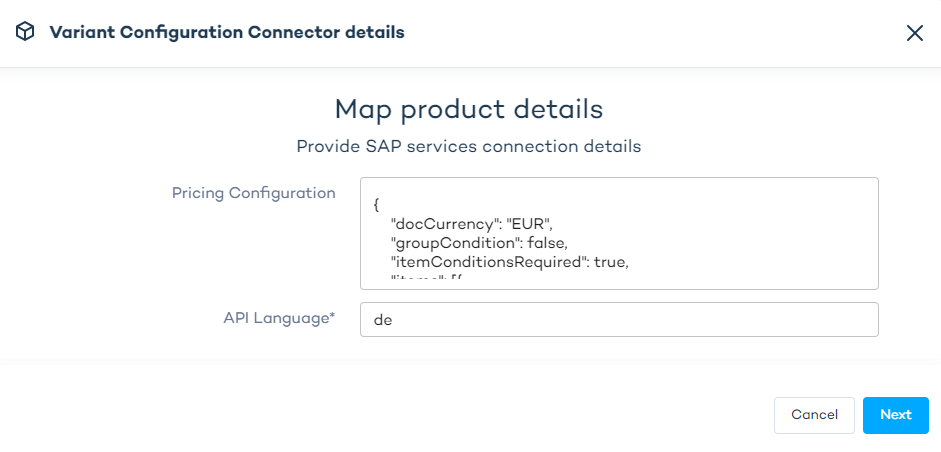
For each non-ROOT locale, apply connection settings again and provide:
apiLanguagepricingConfigurationif you want locale-specific pricing configuration. If it's not provided, the ROOT locale'spricingConfigurationwill be used.
German locale connection settings example
{
    "clientId": "",
    "clientSecret": "",
    "authenticationUrl": "",
    "baseUrl": "",
    "psBaseUrl": "",
    "pricingConfiguration": "{\"docCurrency\": \"EUR\",\"groupCondition\": false,\"itemConditionsRequired\": true,\"items\": [{\"accessDateList\": [{\"name\": \"KOMK-PRSDT\",\"value\": \"2024-05-01\"}, {\"name\": \"KOMK-FBUDA\",\"value\": \"2024-05-01\"}],\"itemId\": \"1\",\"attributes\": [{\"name\": \"KOMK-PLTYP\",\"values\": [\"Z1\"]}, {\"name\": \"KOMK-VKORG\",\"values\": [\"0001\"]}, {\"name\": \"KOMK-VTWEG\",\"values\": [\"01\"]}, {\"name\": \"KOMK-WAERK\",\"values\": [\"EUR\"]}, {\"name\": \"KOMP-PMATN\",\"values\": [\"$.productKey\"]}, {\"name\": \"KOMK-SPART\",\"values\": [\"01\"]}, {\"name\": \"KOMK-LAND1\",\"values\": [\"DE\"]}, {\"name\": \"KOMP-PRSFD\",\"values\": [\"X\"]}, {\"name\": \"KOMP-VARCOND\",\"values\": [\"$.rootItem.characteristics[?(@.id == \\\"VC057\\\")].values[0].value\"]}, {\"name\": \"PRSFD\",\"values\": [\"X\"]}],\"quantity\": {\"unit\": \"PCE\",\"value\": 5},\"productDetails\": {\"productId\": \"$.productKey\",\"baseUnit\": \"PCE\",\"alternateProductUnits\": null},\"statistical\": false,\"variantConditions\": [{\"factor\": 1,\"key\": \"$.rootItem.characteristics[?(@.id == \\\"VC057\\\")].values[0].value\"}]}],\"locCurrency\": \"EUR\", \"pricingProcedure\":\"ZVAR15\"}",
    "knowledgeBase": "",
    "productId": "",
    "apiLanguage": "de"
}
The result settings for de-DE locale will be:
{
  "clientId": "sb-56cce877-efe8-4855-ba7e-c445d6f80fcf!b114081|cpservices-secured!b1725",
  "clientSecret": "GqKMEmXJ9UTFgZ5gOtkQZgS3uEQ=",
  "authenticationURL": "https://cpqtestmapal.authentication.eu10.hana.ondemand.com/oauth/token",
  "baseURL": "https://cpservices-product-configuration.cfapps.eu10.hana.ondemand.com",
  "psBaseUrl": "https://cpservices-pricing.cfapps.eu10.hana.ondemand.com",
  "pricingConfiguration": "{\"docCurrency\": \"EUR\",\"groupCondition\": false,\"itemConditionsRequired\": true,\"items\": [{\"accessDateList\": [{\"name\": \"KOMK-PRSDT\",\"value\": \"2024-05-01\"}, {\"name\": \"KOMK-FBUDA\",\"value\": \"2024-05-01\"}],\"itemId\": \"1\",\"attributes\": [{\"name\": \"KOMK-PLTYP\",\"values\": [\"Z1\"]}, {\"name\": \"KOMK-VKORG\",\"values\": [\"0001\"]}, {\"name\": \"KOMK-VTWEG\",\"values\": [\"01\"]}, {\"name\": \"KOMK-WAERK\",\"values\": [\"EUR\"]}, {\"name\": \"KOMP-PMATN\",\"values\": [\"$.productKey\"]}, {\"name\": \"KOMK-SPART\",\"values\": [\"01\"]}, {\"name\": \"KOMK-LAND1\",\"values\": [\"DE\"]}, {\"name\": \"KOMP-PRSFD\",\"values\": [\"X\"]}, {\"name\": \"KOMP-VARCOND\",\"values\": [\"$.rootItem.characteristics[?(@.id == \\\"VC057\\\")].values[0].value\"]}, {\"name\": \"PRSFD\",\"values\": [\"X\"]}],\"quantity\": {\"unit\": \"PCE\",\"value\": 5},\"productDetails\": {\"productId\": \"$.productKey\",\"baseUnit\": \"PCE\",\"alternateProductUnits\": null},\"statistical\": false,\"variantConditions\": [{\"factor\": 1,\"key\": \"$.rootItem.characteristics[?(@.id == \\\"VC057\\\")].values[0].value\"}]}],\"locCurrency\": \"EUR\", \"pricingProcedure\":\"ZVAR15\"}",
  "knowledgeBase": "28",
  "productId": "000000000030118261",
  "apiLanguage": "de"
}
Add custom summary price logic
If you need custom price calculation in the summary:
- Go to the
Composetab. - Open
Selection summary. - Open
Configuration Price Logic. - Enable
Use custom price logic. - Paste your script and save.
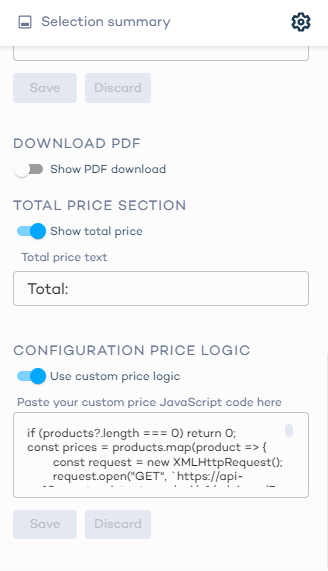
Example script
if (products?.length === 0) return 0;
const prices = products
.filter((x) => x.metaData.sapCpq.isComplete)
.map((product) => {
const request = new XMLHttpRequest();
request.open("POST", `https://qa3-api.dev.zoovu.io/advisor-fe-web/api/v1/advisors/JgJFRzFR/configurator/vcps/price-calculation?locale=en-IE§ionId=${product.sectionId}&configurationId=${product.metaData.sapCpq.configurationId}`, true);
request.setRequestHeader('Content-type', 'application/json');
const runtimeParams = [
{"op": "replace", "path": "/items/0/quantity", "value": {value: 3,unit: "EA"}},
{"op": "replace", "path": "/docCurrency", "value": "EUR"},
{"op": "replace", "path": "/items/0/accessDateList", "value": [{name: "KOMK-PRSDT",value: "2024-11-29"},{name: "KOMK-FBUDA",value: "2024-11-29"}]},
];
request.send(JSON.stringify(runtimeParams));
if (request.status === 200) {
return Number(JSON.parse(request.responseText)?.grossValue);
} else {
console.error(`Failed to fetch price for product ${product.sectionId}`);
return null;
}
});
const totalPrice = prices.reduce((a, b) => a + (b || 0), 0);
return totalPrice;
The value JgJFRzFR used in the example endpoint is the advisor code of the published configurator.
This is a simple example script intended for testing.
Runtime behavior
Product configuration
An SAP configurator is used to configure a single product. A configuration is complete when the user has provided all selections required to define that product.
To verify the result:
- Open the configurator and complete all required selections.
- Check the last /products endpoint response.
- In the response payload, go to:
sectionProducts -> 0 -> productInstance -> metaData -> sapCpq
This object contains:
configurationId— the unique SAP configuration IDisComplete— whether all required data has been providedisValid— whether the configuration is valid according to SAP rules
A usable configuration must be both complete and valid.
Example /products call
Example configuration ID: 13ah57fa-lkjh-44c9-abc1-be91e9d1601e
A configuration ID can expire over time and may need to be recalculated.
Once you have the configuration ID, you can retrieve the full SAP configuration by calling:
GET api/v2/configurations/{configurationId}
Price calculation
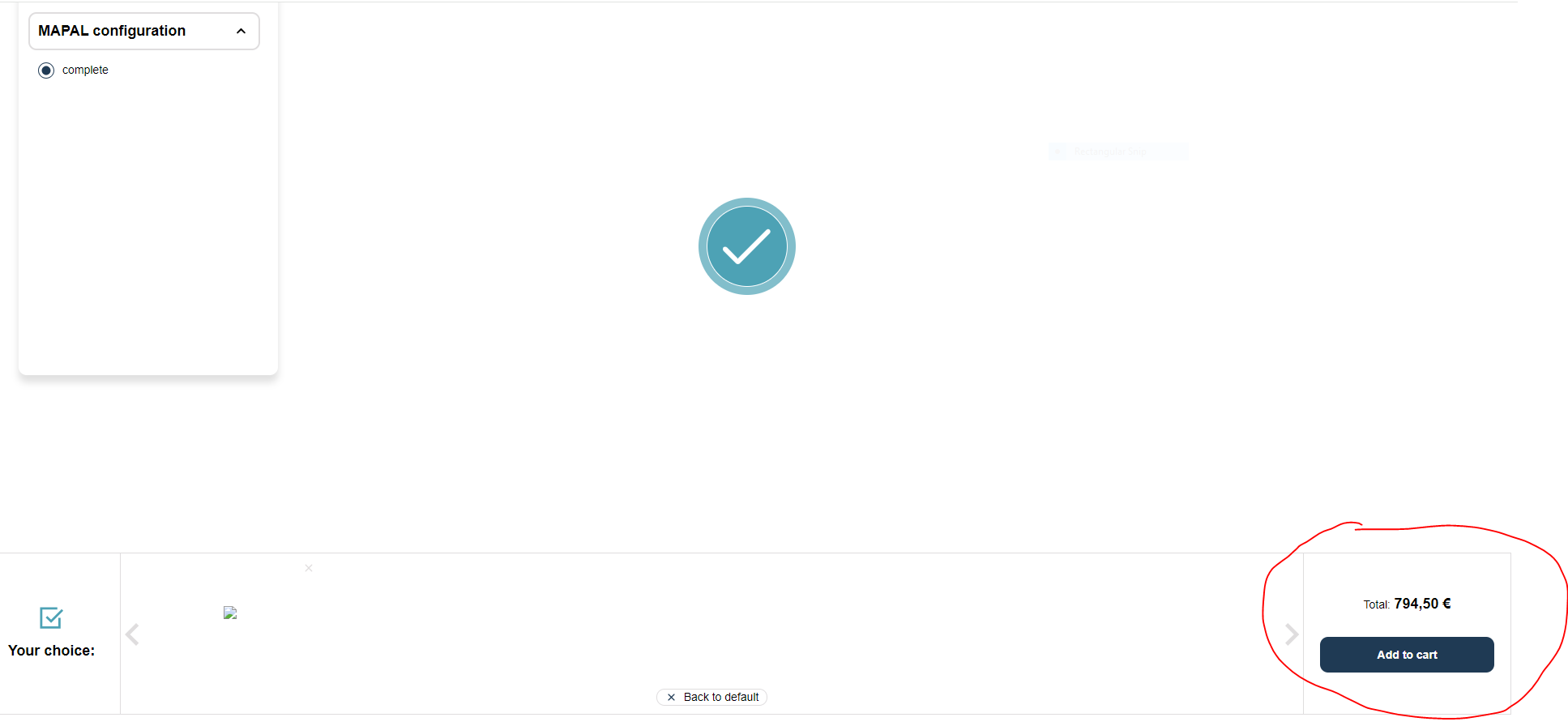
Price calculation runs when a configured product is added to the summary. After the user completes the required selections, the calculated price should appear in the summary.