SAP CPQ
SAP CPQ in Zoovu brings SAP’s product configuration and pricing capabilities into Zoovu configurators. It is used for products that must be configured as a single, valid, purchasable item based on a user’s selections.
With SAP CPQ, you can:
- configure a product through guided user selections
- validate whether the resulting configuration is complete and valid
- calculate pricing through SAP pricing services, if enabled
- return a configured product that reflects SAP configuration rules
To use SAP CPQ in Zoovu, you need an existing SAP CPQ setup and the required SAP credentials. To enable it in your configurator, contact your Zoovu representative or email the Customer Success Team.
SAP CPQ in configurators
The data source for SAP configurators is the SAP system.
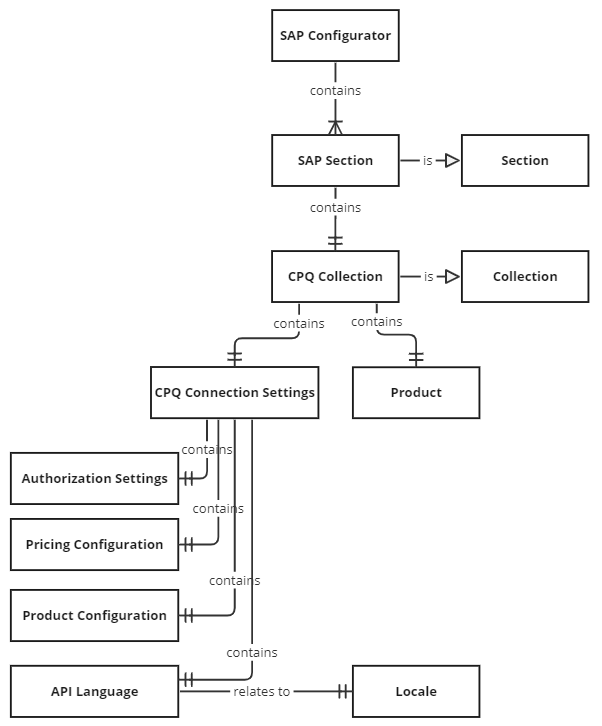
A configurator can contain multiple sections, and each section can be linked to a catalog. When you link a section to an SAP Catalog, that section becomes a CPQ section and uses SAP CPQ services for product configuration.
During a configurator session, the platform:
- authenticates with SAP
- creates a new configuration
- maps user selections to SAP characteristics
- updates the configuration
- reads the resulting configuration state
- returns the configured product
Pricing
If SAP pricing is enabled, price calculation is handled through SAP pricing services using:
psBaseUrlpricingConfiguration
Price calculation is triggered when a configured product is added to the summary. You can also apply custom JavaScript price logic in the Selection Summary if your project needs project-specific calculations.
Locale handling
In multi-locale projects, SAP connection settings are inherited from the ROOT locale.
For non-ROOT locales, the only values that can differ are:
apiLanguagepricingConfiguration
If no pricing configuration is provided for a non-ROOT locale, the ROOT locale’s pricing configuration is used.
Domain diagram