Custom pricing in configurators
The Visual Configurator calculates a total price by default (it sums standard product prices). If you need promotions, tiered discounts, or to show sale pricing, you can set up custom pricing with a small piece of JavaScript.
This guide shows how to turn the feature on and gives copy‑paste patterns you can adapt.
What you’ll need
- Access to your configurator in Conversation Studio (or standalone Configuration Studio).
- The attribute names you’ll read (e.g.
category,sale price) - Basic JavaScript familiarity.
Enable custom pricing
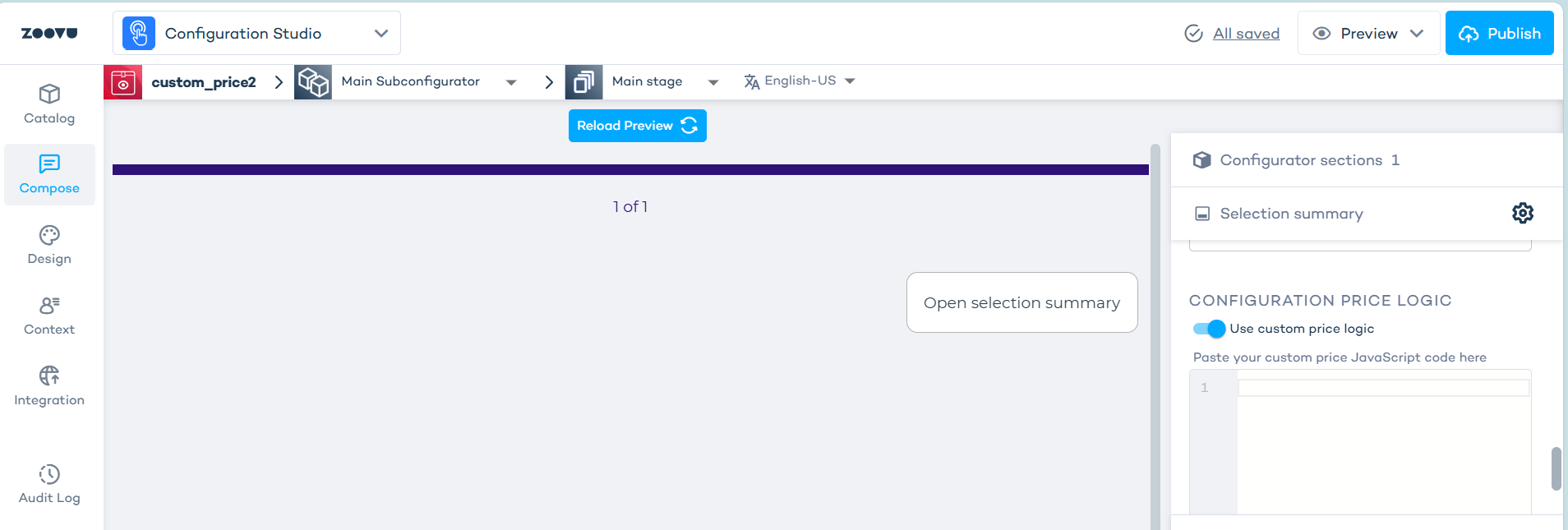
- Open your configurator in Configuration Studio.
- Right panel → your section → Settings (cog) → Selection summary.
- Toggle on “Use custom price logic”.
- Paste one of the script patterns below (only one at a time).
What your script receives
products: array of selected product objectstotal: number (sum of standard/list prices)locale: string (e.g.en-GB,de-DE)
Return a number. If nothing is selected, return 0.
Reusable helpers
These helpers:
- Format currency per locale, including zero‑decimal currencies like JPY.
- Safely create your own price container under a stable selector, avoiding internal classes.
// Adjust to your markets; remove what you don't need

const CURRENCIES = {
  'en-US': 'USD', 'en-GB': 'GBP', 'de-DE': 'EUR', 'fr-FR': 'EUR',
  'nl-NL': 'EUR', 'it-IT': 'EUR', 'es-ES': 'EUR', 'ja-JP': 'JPY', 'ko-KR': 'KRW'
};
const DEFAULT_CCY = 'USD';
const ZERO_DECIMAL = new Set(['JPY', 'KRW']);

// Resolve currency from locale
function getCurrency() {
  return CURRENCIES[locale] || DEFAULT_CCY;
}

// Format amounts for display
function fmt(amount) {
  const ccy = getCurrency();
  const opts = { style: 'currency', currency: ccy };
  if (ZERO_DECIMAL.has(ccy)) { opts.minimumFractionDigits = 0; opts.maximumFractionDigits = 0; }
  return new Intl.NumberFormat(locale, opts).format(amount);
}

// Round the numeric return according to currency
function roundForCurrency(amount) {
  const ccy = getCurrency();
  return ZERO_DECIMAL.has(ccy) ? Math.round(amount) : Number(amount.toFixed(2));
}

// Ensure we have our own container under a stable host
function ensurePriceContainer() {
  const host = document.querySelector('[data-testid="total-price"]');
  if (!host) return null;
  let wrap = host.querySelector('.zv-price-container');
  if (!wrap) {
    wrap = document.createElement('div');
    wrap.className = 'zv-price-container';
    wrap.style.display = 'grid';
    wrap.style.gap = '4px';
    host.appendChild(wrap);
  }
  return wrap;
}
Notes for reliability
- Use stable hooks (like
data-testid="total-price") and your own injected container. Avoid internal class names that can change. - Format currencies per locale, including zero‑decimal currencies (e.g. USD).
- Don’t insert untrusted HTML; use
textContentfor dynamic data. - Test in Preview with empty, edge, and full selections.