Manage units per locale
Locale-based units let you set different units for the same attribute depending on the shopper’s region. It is useful when one attribute, such as Price, must show a different currency in each locale.
Use this feature when your markets share a language but require different regional units. For example, EUR for France and CHF for Switzerland.
How it works
- If a locale has a unit assigned, that unit is used.
- If a locale is not configured, the language-based unit is used.
Existing projects continue to work as before unless you explicitly add locale overrides.
Setup
Step 1: Open the attribute
- Go to Data Platform.
- Open Catalogs in the left navigation.
- Select Attributes.
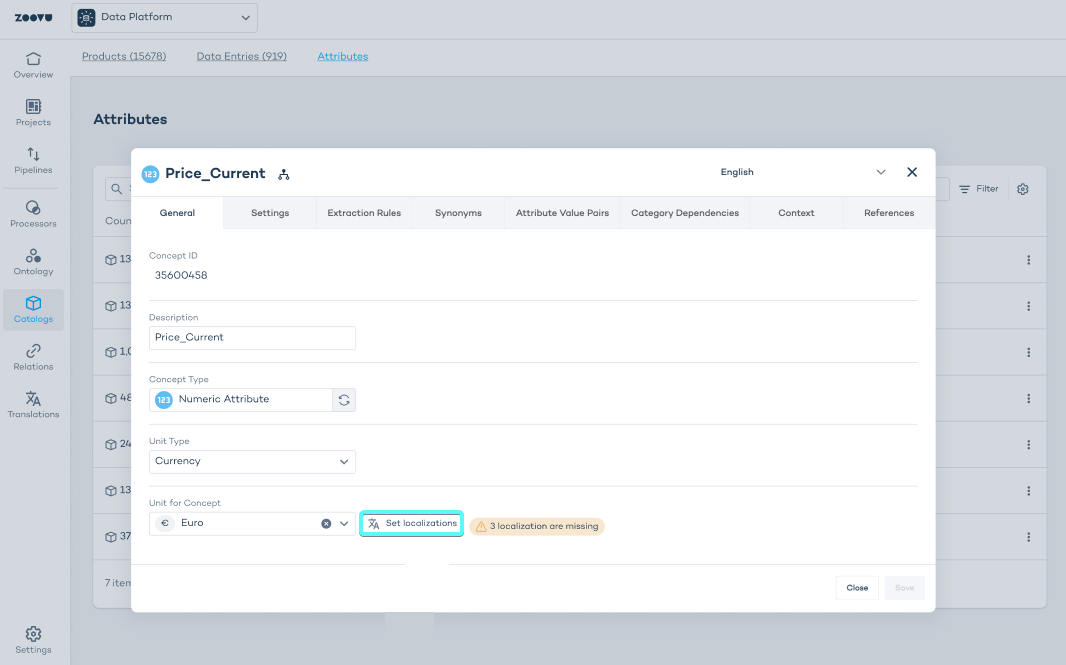
- Click the attribute you want to configure (for example,
Price_Current).
Step 2: Open unit localization
In the General tab of the attribute:
- Make sure the attribute has a Unit Type (e.g. Currency).
- In Unit for Concept, click Set localizations.
- This opens a panel showing all available locales for that language.
Step 3: Assign units per locale
For each locale:
- Select the unit you want to assign (e.g. Euro, US Dollar, British Pound).
- Repeat this for all locales relevant to your region setup.
- Click Save.
Locale-specific values will now override the language default whenever a user views data in that locale.