Data Platform MCP Tools
MCP (Model Context Protocol) lets your AI chat work with live product data while it chats with a user. It does this by exposing specific “tools” that the chat can call, e.g. retrieving product details. Zoovu provides MCP servers that handle these tools for you.
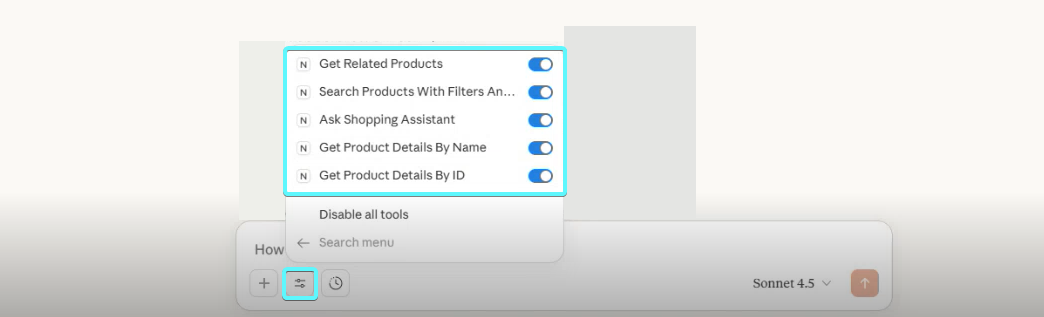
Tool 1: products_get_details
Description: Gets product details for one or more products. Pass a single identifier to get a single product object, or pass identifiers (up to 3) to get an array of products in one call.
Parameters
| Parameter | Type | Required | Description |
|---|---|---|---|
identifier | string | No | Single product identifier from search results. Use the identifier field directly from search result product variants. |
identifiers | array | No | Array of up to 3 product identifiers to fetch in one call. When provided, the response is always an array. Can be combined with identifier — duplicates are ignored. |
conversationContext | string | Yes | Recent conversation context |
At least one of identifier or identifiers must be provided.
Returns: Complete product information including name, link, images, categories, specifications, and last update timestamp.
Which attributes are returned: If the Product Details attribute group is configured under Attribute Groups, the response includes only the attributes in that group (in the group's order); otherwise all available attributes are returned. The same group also drives the default attribute set of the Get product details and Get product details (bulk) Platform APIs.
Tool 2: products_get_details_by_name
Description: Gets product details by product name. Fallback option - prefer products_get_details when identifier is available.
Parameters
| Parameter | Type | Required | Description |
|---|---|---|---|
name | string | Yes | Exact product name |
conversationContext | string | Yes | Recent conversation context |
Returns: Same as products_get_details - complete product information.
Tool 3: products_get_filter_options
Description: Returns all available filter options for the catalog. Always returns catalog-wide options (not scoped to any query). To apply filters to a search, use the products_search_with_filters tool.
Modes
| Mode | selected_keys | What you get |
|---|---|---|
| Slim discovery | omitted or empty | All filter names, keys, and types. COLLECTION filters include a sampleValues preview (up to 3 values). No full value lists or counts. |
| Full detail | one or more keys | Complete values and counts for the requested filters only. All other filters are omitted. |
Recommended workflow: slim call → pick filter(s) → full detail call → search with products_search_with_filters.
Parameters
| Parameter | Type | Required | Description |
|---|---|---|---|
selected_keys | array | No | Filter keys to retrieve in full detail. Get keys from a prior slim call. |
Filter types
| Type | Description |
|---|---|
RANGE | Numeric range with min/max values and optional unit |
COLLECTION | Value list. Includes a logic field: OR (union) or AND (intersection) |
BOOLEAN | True/false filter |
TREE | Category/hierarchy. Includes a logic field: OR or AND |
Returns: JSON object with a filterOptions array. Each filter includes its key, name, type, and (depending on mode) values, sample values, or min/max ranges.
Tool 4: products_search_with_filters
Description: Searches products using a short generic query combined with filters. Always prefer short queries (1-2 words) and use filters for specificity. Call products_get_filter_options first (catalog-wide, cached) to discover available filter names, keys, and values before searching. Results are paginated.
Core parameters
| Parameter | Type | Required | Default | Description |
|---|---|---|---|---|
query | string | No | "*" | Short, generic search query — 1 to 2 words maximum (e.g. 'drill', 'laptop', 'cable'). Overly specific queries reduce result quality. |
conversationContext | string | No | - | Recent conversation context |
cursor | string | No | - | Pagination cursor. Use nextCursor from previous response to get next page (same filtering and sorting is applied). Omit for first page. Can be combined with limit to retrieve the next n results. |
limit | number | No | page size | Max products to return (1 to the configured page size). Lower it to shrink the response when only the top N results are needed. Can change between paginated calls. |
filters | string (JSON) | No | - | JSON array of filter objects to apply. Use products_get_filter_options to discover filter names, keys and available values. See filter format below. |
\{FilterName\}_min / \{FilterName\}_max | number | No | - | Dynamic range filter parameters based on search configuration (see below) |
sortBy | enum | No | - | Sorting options based on search configuration (see below). Not available if no sorting options are configured. |
Filter format (via filters parameter)
Use products_get_filter_options to discover filter names, keys, and available values. The filters parameter accepts a JSON array of filter objects:
- COLLECTION filter:
{"name":"Color","key":"123","values":[{"value":"Red"},{"value":"Blue"}]} - RANGE filter:
{"name":"Price","key":"456","min":10,"max":100} - BOOLEAN filter:
{"name":"USB 2.0","key":"789","booleanValue":true} - TREE filter:
{"name":"Category","key":"999","values":[{"value":"ROOT/Beleuchtung/Sicherheitsleuchten"}]}
Dynamic range filter parameters
When Filters in Schema (filtersInSchema) is enabled in your MCP configuration, this tool also includes dynamic min/max parameters directly in its schema based on your search filter configuration.
This option is generally not recommended since the introduction of the products_get_filter_options → products_search_with_filters tool flow, which covers the same use cases. Leave it unchecked if you are unsure. (This setting may become admin-only.)
- Numeric filters: Visible RANGE filters from your search filter configuration can be used as dynamic min/max parameters.
- Up to 6 filters: The 6 numeric filters with the highest product counts will be used.
- Min/max pairs: Each filter provides both minimum and maximum parameters based on the filter names (i.e.
\{FilterName\}_minand\{FilterName\}_max). - Possible range of values: The available range of values is part of the dynamic parameter's description.
Example dynamic filter parameters:
Price_min/Price_max: Filter by price rangeWeight_min/Weight_max: Filter by weight range
Schema-level range filters and the filters JSON parameter can be used together. If the same filter key appears in both, the schema-level parameter takes precedence.
Sorting parameter
The tool may also include a sortBy parameter with options based on your search sorting configuration:
Example sorting options:
Date_Added_DESC: Newest products firstPrice_ASC: Cheapest firstPrice_DESC: Most expensive firstProduct_Name_ASC: Alphabetical orderPopular_DESC: Most popular first
Available filters and sorting options depend on your search configuration.
Returns:
- List of matching products (identifier, name, link, image, price, leaf category, key specifications)
- Pagination cursor (
nextCursor) for retrieving next page - Total results count
- Current page information
Tool 5: products_get_related
Description: Find products related to a specific product (alternatives, compatible items, accessories, etc.). Limited to 40 total results.
Availability: This tool is only available if product relations are configured in your project. If no relations are defined, this tool will not appear.
If your project uses MCP and Relations, you can adjust the descriptions of relation types directly on the Relations page. Clear descriptions help the AI understand when each relation type should be used, which improves how queries are resolved.
Parameters
| Parameter | Type | Required | Description |
|---|---|---|---|
identifier | string | Yes | Product identifier to find relations for |
query | string | No | Single-word query to filter related products (e.g. compatible 'charger' for a found laptop) |
attributeKeys | array | No | Attribute keys (from products_get_filter_options, slim mode) to always include in each product's dataPoints. Pinned keys appear first. |
conversationContext | string | Yes | Recent conversation context |
relationTypes | array | No | Filter by specific relation types. When using, prefer selecting more types. (see below) |
Relation types
The relationTypes parameter allows filtering by specific relationship categories. Available relation types are configured in your project and vary by catalog.
Common relation type examples:
- Compatible: Products that work together
- Alternative: Substitute or replacement products
- Custom relation types
Each relation type groups multiple specific relationships. When fewer relation types are specified, more results per type will be returned.
The specific relation types and relationships available depend entirely on your project configuration. If no relation types are specified, all configured relations will be included.
Returns: Related products grouped by relationship tag and relationship name, including:
- Relationship descriptions
- List of related products with identifier, name, link, image, price, and key specifications
Tool 6: products_ask_assistant
Description: Ask our AI shopping expert Zoe about product features, materials, comparisons, buying advice, or general product questions.
Availability: This tool is only available if the Zoovu Advisor integration is configured in your project. Configuration requires:
- Zoovu Advisor setup in Advisor Studio
zoeAppKeyconfigured in your MCP config
If not configured, this tool will not appear.
Parameters
| Parameter | Type | Required | Description |
|---|---|---|---|
question | string | Yes | Question about products, features, materials, comparisons, or buying guidance |
identifiers | array | No | Product identifiers for questions about specific products |
conversationContext | string | Yes | Recent conversation context |
When to use this tool
The AI assistant uses this tool when the user needs expert knowledge or guidance rather than searching for specific products. Example user queries:
- "What's the difference between memory foam types?"
- "When should I buy organic cotton vs regular cotton?"
- "What features should I look for in X?"
- "Is this product good for sensitive skin?"
- "Compare these two items"
Returns: Natural language answer from the AI shopping assistant based on product knowledge, specific product data (if identifiers provided), and the user's locale/region settings.
Tool availability
| Tool | Always available? | Notes |
|---|---|---|
products_get_details | Yes | Core tool — supports single or batch (up to 3) identifiers |
products_get_details_by_name | Yes | Core tool |
products_get_filter_options | Yes | Catalog-wide filter discovery (slim) and detail (with selected_keys) |
products_search_with_filters | Yes | Additional parameters vary by configuration |
products_get_related | Conditional | Only if relations are configured |
products_ask_assistant | Conditional | Only if Zoe is configured |
Customizing how results are presented to end users
While the MCP server always returns complete product information, you can control how the AI assistant presents this information to end users in the chat window by configuring the assistant's system instructions or prompts in your MCP client application.
Examples of presentation instructions:
- "Always present product information in a clean, readable format without showing prices"
- "When showing product results, display only the product name, identifier, and a brief description"
- "Summarize technical specifications in simple language for non-technical users"
- "Always include product images in your responses when available"
- "Present product comparisons in a side-by-side table format"
These instructions don't change what data the MCP server returns - they control how the AI assistant communicates that information to end users in the chat interface. Configure these instructions when setting up your chatbot or AI agent in the MCP client application.