Zoe skills
Zoe skills shape how Zoe guides a conversation. Some skills help start the interaction. Others keep the conversation moving, narrow down results, or suggest the next useful action.
Skills and tools in Zoe are related, but they serve different purposes.
- Skills shape what Zoe does in the conversation.
- Tools give Zoe access to the product, search, or content data needed to support those actions.
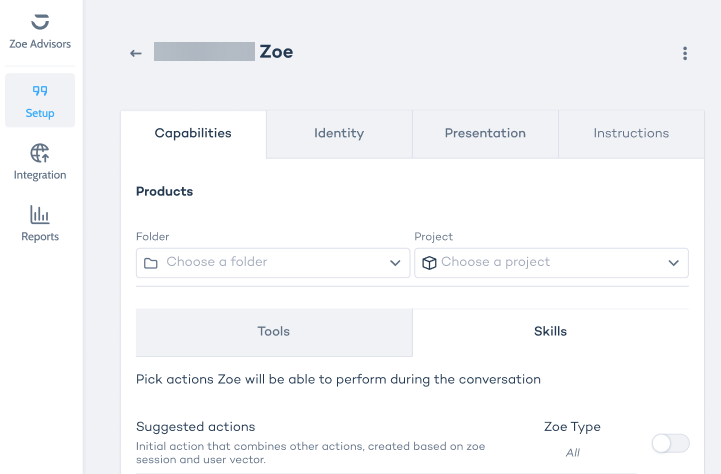
To set up skills, open your Zoe in Advisor Studio and go to Editor > Capabilities > Skills.
Choosing skills
If you want Zoe to:
- start the conversation with relevant prompts, enable Suggested actions or Static suggested questions
- guide users through narrowing options, enable Guided questions
- keep the conversation moving naturally, enable Suggested questions and Casual question
- support shortlist evaluation, enable Suggested comparison
- recover from empty search results, enable Suggested filters
- offer other options quickly, enable Suggested alternatives
You do not need to turn on every skill. A smaller set that fits the experience usually works better than a long list of loosely related actions.
Suggested actions
This skill is a smart starting point for advanced chat experiences. Depending on the session context, it can include a mix of suggested questions, suggested comparison and suggested alternatives.
Best for:
- advanced Zoe setups
- product detail pages
- journeys where Zoe should open with relevant next steps instead of a blank state
Guided questions
Guided questions present a single-choice question with answer options linked to filters. When a user selects an option, Zoe uses that choice to refine the result set.
Best for:
- immersive experiences
- search-led journeys
- guided product discovery flows
Guided questions depend on questions created in Data Platform's Question Bank. Learn more.
Suggested questions
Suggested questions are generated by the LLM and shown as clickable prompts. They can appear before the conversation starts and continue after user messages for a limited number of generation rounds.
Best for:
- conversations that benefit from light guidance
- journeys where you want Zoe to suggest useful follow-up questions
- setups where fully static prompts feel too rigid
Static suggested questions
These questions appear before the conversation starts and disappear after the first message. They are useful when you want tighter editorial control over the opening prompts.
Best for:
- curated product detail page experiences
- teams that want consistent, reusable starter questions
- simpler setups with a small number of predictable user intents
Casual question
Casual question is used when no stronger action is available and Zoe still wants to invite the next step. Depending on the context, it can be product-oriented or, in some cases, search-oriented.
Best for:
- keeping conversations from stalling
- maintaining momentum after an answer
- filling gaps when no other action fits
Suggested comparison
Suggested comparison gives the user a clickable way to open a structured comparison. In advanced setups, that comparison can appear in chat. In immersive setups, it can open as a comparison modal.
Best for:
- journeys where users often compare a shortlist
- product categories with meaningful comparison attributes
- advanced or immersive experiences focused on decision support
Suggested comparison depends on comparison attributes being configured in Data Platform. Learn more.
Suggested filters
Suggested filters appear when a search returns no results and relevant fallback filters are available in the active search session. Instead of stopping at “no matches,” Zoe can offer a useful next step.
Best for:
- immersive search experiences
- broad catalogs where empty-result states are common
- flows where refinement matters more than restarting the search
Suggested alternatives
Suggested alternatives appears inside Suggested actions and opens a list of alternative products. This is useful when the current product is not the best fit and Zoe should offer another path forward. Best for experiences where alternatives matter more than comparison.
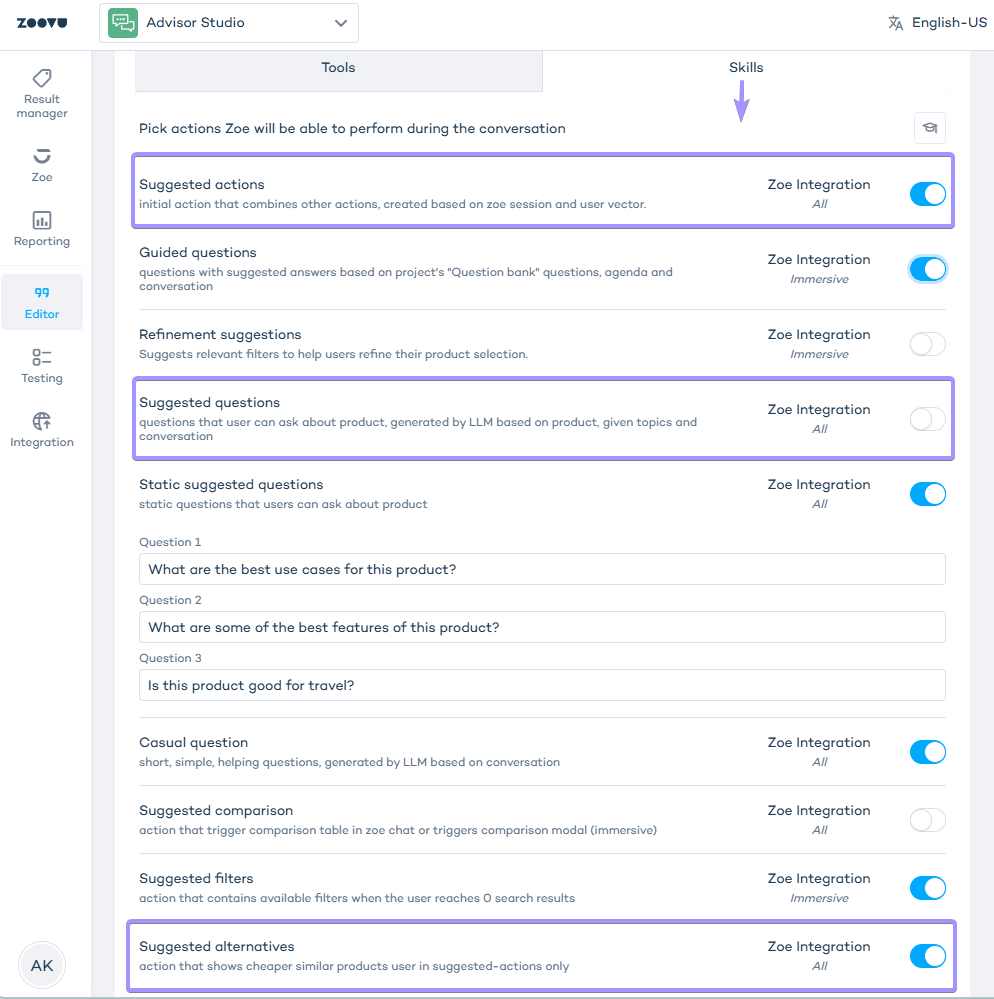
To enable alternatives, switch on the following toggles under Skills:
- Suggested actions
- Suggested questions
- Suggested alternatives
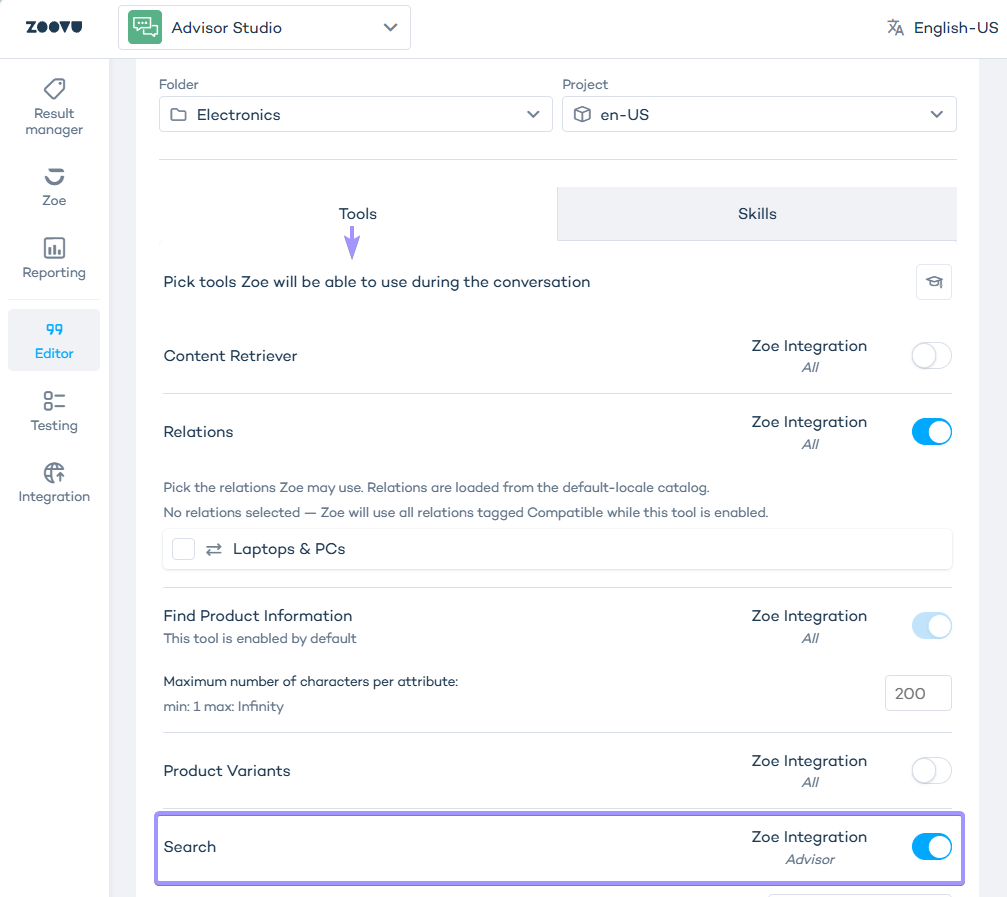
Make sure to enable the search vector under Tools as well: