Zoe tools
Each Zoe tool acts as a specialized capability that extends what Zoe can do: look up product details, variants, compatible items, similar products and document-based content to answer more accurately. Here's the flow:
- The user asks Zoe a question (e.g. "What accessories are compatible with product X?")
- The AI analyzes the query and determines which tool(s) are needed to answer it
- Zoe calls the selected tool with appropriate parameters (e.g. product SKU)
- The AI receives the tool's response and incorporates this real-world data into its answer
Tools are what connect Zoe to your product data and content sources. Tone, style, and behavioral instructions are configured in the other tabs (Identity, Delivery, Instructions).
Configure Zoe tools
To set up tools, edit your Zoe in Advisor Studio and go to Editor > Capabilities > Tools. Go to Custom Parameters for advanced options.
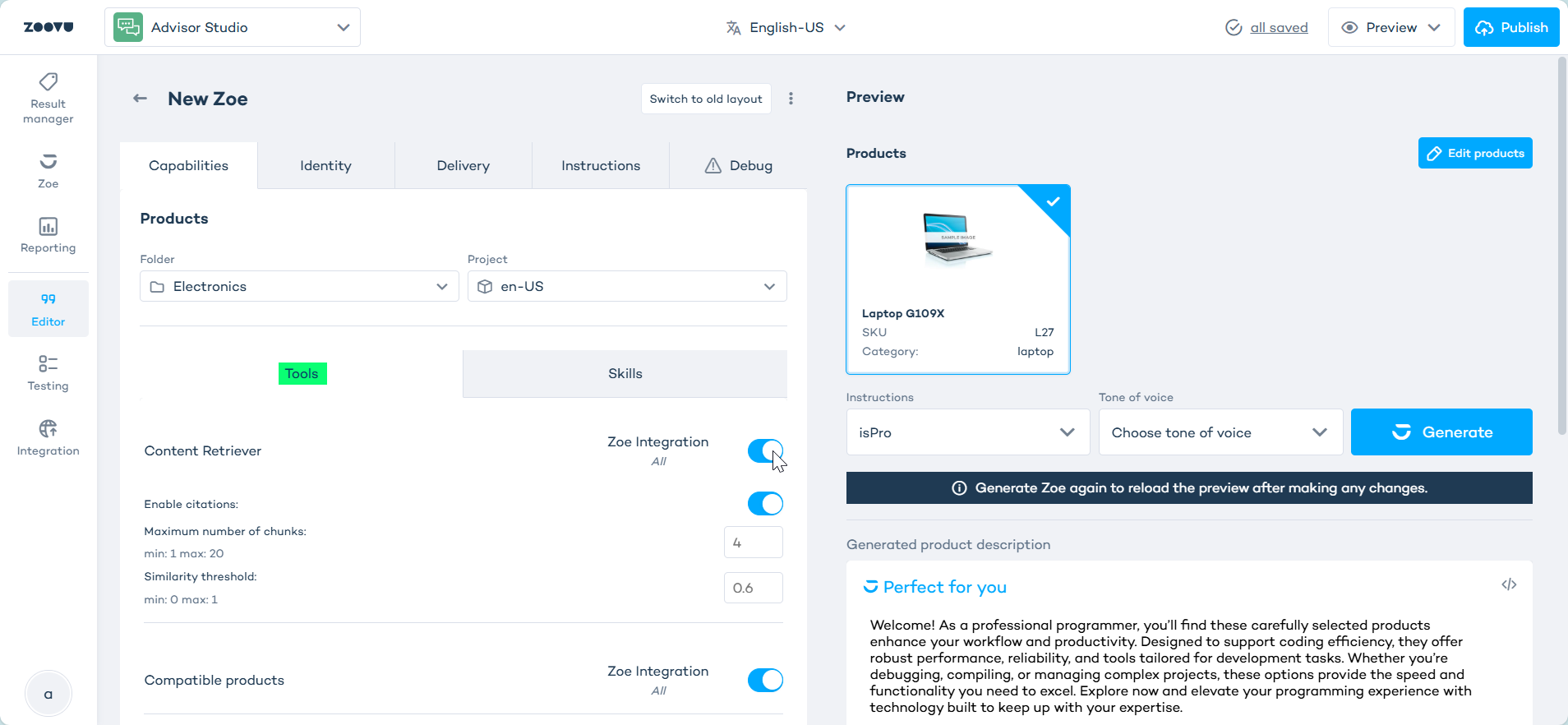
At the top of the Editor, select the Folder and Project Zoe should use. This determines the Data Platform source for product-related tools.
Choosing the right tools
Choose tools based on the type of help you want Zoe to provide, rather than enabling them all. A focused tool set usually works better than a broad one.
If you want Zoe to:
- answer product questions, use Products Information
- discuss sizes, colors, or other versions of a product, add Product Variants
- recommend accessories or spare parts, add Compatible Products
- suggest alternatives or similar items, add Search Products
- answer from manuals or help content, add Content Retriever
After making changes, test with real questions such as:
- "What are the key features of this product?"
- "What accessories work with this model?"
- "What does the manual say about cleaning?"
Products Information
Allows Zoe to retrieve detailed product information by SKU or name. This tool is enabled by default and cannot be disabled.
Maximum number of characters per product attribute: This parameter limits the length of product attribute value that Zoe consumes. Truncates any attribute that exceeds this character limit. The default value is 200.
Available in: PDPs, assistants, conversational discovery
Product Variants
This tool requires variants to be configured in Data Platform before enabling here. Learn more. The account must have the RELATIONS feature switch enabled.
Allows Zoe to present product variants (e.g. different sizes or colors) for a given product.
Variant limit: Maximum number of variants Zoe will return for a single product. The default value is 300.
Disabled by default. Available in: PDPs, assistants
Relations
This tool requires relations to be configured in Data Platform, using the Compatible relation type.
Allows Zoe to suggest related products for a given product (e.g. accessories or spare parts).
Configuration:
- Relations selection: Lets you pick specific relations to use. If none are picked, Zoe uses all relations tagged
Compatiblewhile this tool is enabled. - Cross-sell questions: Lets Zoe ask questions about related products (requires the
casual-questionSkill to be enabled - Learn more.). Options:- Minimum questions before cross-sell: Number of questions Zoe must ask before offering a cross-sell suggestion. Default: 1 (0-Infinity)
- Pause between categories: Number of questions Zoe waits before cross-selling again within the same category. Default: 1 (0-Infinity)
Disabled by default. Available in: PDPs, assistants, PLPs (Cross-sell questions are not available in PLPs)
Search Products
Requires vector database search to be configured in Data Platform before enabling here. Learn more.
Allows Zoe to search for similar or alternative products using vector search.
Configuration:
-
Similarity — Controls the relaxation level of the similarity strategy. It accepts three discrete values:
- Default Behavior: strict and the most precise
- Retry With Relaxed Filters: bypasses filters if the result set would be empty
- Vector-only Search: bypasses product category limitations entirely, returning nearest products based on vector database similarity
-
API key — Pass an API key for authenticating.
-
Category source — Defines the source of product category information for filtering search results. Options include:
- Zoovu: Zoovu ontology.
- Custom: Customer ontology.
-
Show products in the chat — Shows products directly in the Zoe conversation area whenever Zoe refines the search
Available in: PLPs, conversational discovery
Content Retriever
Requires the documents/sources to be configured in Data Platform before enabling here. Learn more.
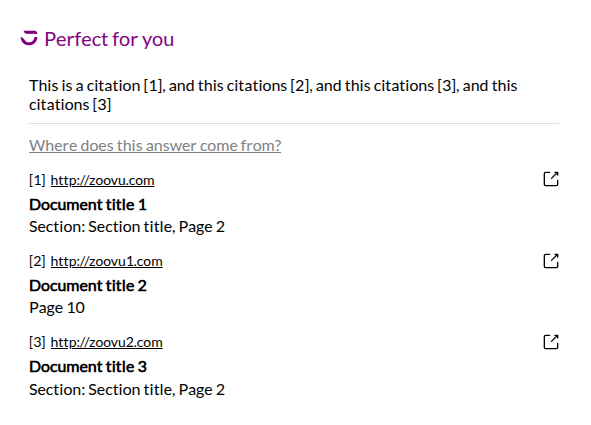
Allows Zoe to retrieve information from external documents and knowledge sources using RAG (Retrieval-Augmented Generation). Here's an example of a Zoe widget with citations:
Configuration:
- Enable citations: When enabled, Zoe displays visual citations indicating which source documents were used to generate a response.
- Maximum number of chunks: Maximum number of document chunks Zoe retrieves per query. Higher values improve answer coverage but increase response time.
- Similarity threshold: Minimum similarity score a document chunk must meet to be included in the retrieval results. Higher values return only the most relevant chunks.
Disabled by default. Available in: PDPs, assistants, conversational discovery
For setup details and tool-specific configuration, continue to Zoe tools reference and use cases.