Shopify connector
You can connect your Shopify store to the Data Platform using the Zoovu Shopify app. The integration keeps your product data in sync automatically, so you do not need manual uploads or exports.
Benefits:
- streamlined setup without file uploads
- automatic, real-time product synchronization
- data ready for cleansing, enrichment, and use in discovery experiences
These instructions apply to new projects. If your organization already uses Zoovu, contact your account manager for setup guidance.
Step 1: Install the shopify app
- Open the Zoovu AI Search and Discovery app in the Shopify App Store.
- Select Install and follow the steps to connect your store.
- Grant the required permissions so the app can access your product and catalog data.
Data sync
Your product data begins syncing as soon as the app is installed. The initial sync may take several minutes depending on catalog size.
You can continue using Shopify while the sync runs in the background.
Step 2: Verify and prepare your data
After the import finishes, your Zoovu sales or solutions contact will help you:
- confirm that your data was imported correctly
- prepare it for use in your discovery experiences
If you encounter any installation or connection issues, please contact your representative or reach out to Zoovu Support.
Enabling Data Entries
If you want to use the Data Entries feature in the Shopify connector, you'll just need to make sure Sx Data Studio is enabled for your project. You can check this in the project settings under the "Services" section:
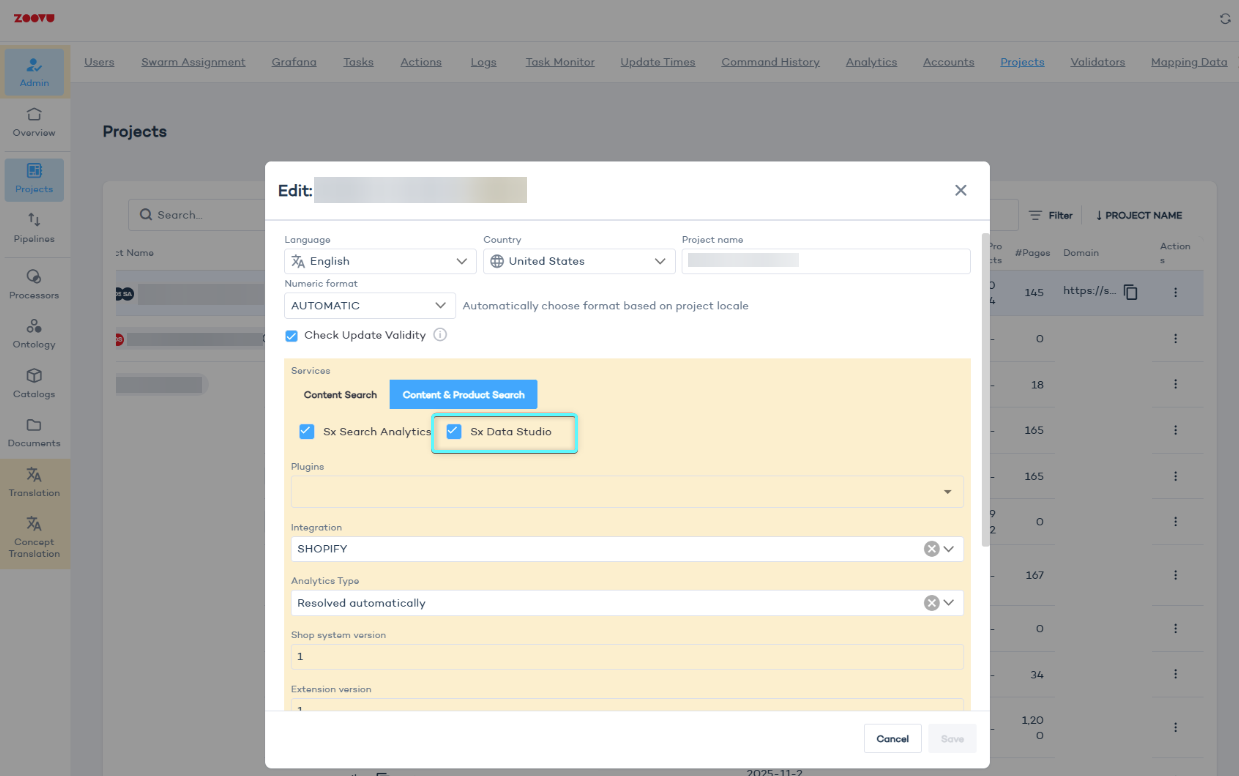
Once the Shopify connector automatically creates your project, our support team will take care of the final step: linking the project to your specific account. You don't need to do anything here; we’ll handle the assignment on our end to make sure everything is connected correctly.